Webflow or Framer: Which No-Code Tool Should You Choose?
Are you torn between Webflow and Framer for building a high-performing no-code website? This article, written by Gemeos, a Webflow agency, compares the two tools based on their strengths: CMS, SEO, animations, design, e-commerce... and helps you choose the best fit for your project.
article summary
- Framer makes it possible to publish a landing page or small website quickly from an interface similar to a design tool.
- Webflow has a steeper learning curve but provides a more structured CMS and greater technical control.
- For a blog, multilingual site, or large-scale content strategy, Webflow is generally more robust and scalable.
- Framer suits startups that prioritize execution speed and smooth animations on a limited editorial scope.
- Choose Webflow for a durable, complex marketing site and Framer for quickly launching a lightweight, design-led experience.
Want to take it further? Ask:
Webflow vs Framer: what do they have in common?
Webflow vs Framer: which user profiles are they built for in 2026?
Is Framer better than Webflow?
Use cases where Framer is the better fit
Framer is often better than Webflow for:
- Highly animated SaaS landing pages.
- Designer portfolios where visual storytelling comes first.
- Short-lived sites (marketing campaigns, product launches).
- Projects where the designer:
- wants to work in an environment close to Figma,
- has few CMS or heavy e-commerce constraints.
Use cases where Webflow still has the edge
Webflow is still the better choice than Framer for:
- Content-heavy sites (blogs, case studies, resources).
- Corporate sites with many pages.
- Native e-commerce with a product catalog.
- Projects where you want to be able to:
- export code,
- keep very fine control over HTML structure.
Decision criteria: advanced design, site complexity, budget, autonomy
- If your priorities are:
- highly animated design + fast launch → Framer.
- solid structure + CMS + long-term scalability → Webflow.
Webflow or Framer: is it free?
Overview of Webflow’s free plans
- Free plan:
- hosting with Webflow branding,
- limited number of pages,
- no custom domain.
Overview of Framer’s free plans
- Free plan:
- hosting with Framer branding,
- limited number of pages,
- custom domain only available on a paid plan.
Limits of the free versions (number of pages, traffic, branding, etc.)
- In both cases:
- limited number of pages and projects,
- mandatory branding,
- ideal for testing or building a simple personal project.
When should you move to a paid plan based on your use case?
- As soon as you have:
- a real professional project,
- the need for a custom domain,
- at least some SEO requirements.
1. Positioning and product philosophy

Webflow starts from a robust CMS foundation built for content production and scale, while Framer leans on a canvas-style interface that feels very close to a design tool to ship wow-factor sites fast.
{usecases}
2. Ease of use
Webflow
- Longer but gradual learning curve
- Interface split into Designer (build) and Editor (content management)
- Extensive Webflow University documentation
Framer
- Immediate to pick up for anyone used to Figma or Sketch
- Minimalist properties panel, drag-and-drop logic
- Fewer concepts to master (no complex CMS collections at the start)
For a very simple project (event site, portfolio), Framer offers unbeatable time-to-market. For an architecture with dozens of articles, categories, or dynamic pages, Webflow becomes more intuitive in the long run.
3. Design: flexibility vs speed

In 2026, Framer still has the edge for micro-interactions and motion design. Webflow answers with very complete Interactions 2.0, but setup is still more technical.
4. CMS and e-commerce features
If your strategy depends on content or online sales, Webflow already gives you all the building blocks. Framer is better suited to promotional pages connected to an external back office.
For a detailed Webflow e-commerce setup, check out our full guide, “How do you create an e-commerce site with Webflow?”.
5. Performance and SEO: 2026 data
Gemeos, a Webflow SEO agency, audited 50 sites published between January and June 2026, split evenly between Webflow and Framer. Here are the average metrics (mobile PageSpeed Insights):
Key differences:
- Framer inserts some analytics scripts by default, increasing initial weight.
- Webflow automatically compresses assets and minifies CSS/JS without a plugin.
- SEO attributes (title, meta, alt) are managed in both cases, but Webflow offers one field per CMS template, reducing the risk of forgetting something.
To go further, read “9 steps to optimize your Webflow site for SEO” on our blog.
6. Ecosystem, integrations, and community
Webflow
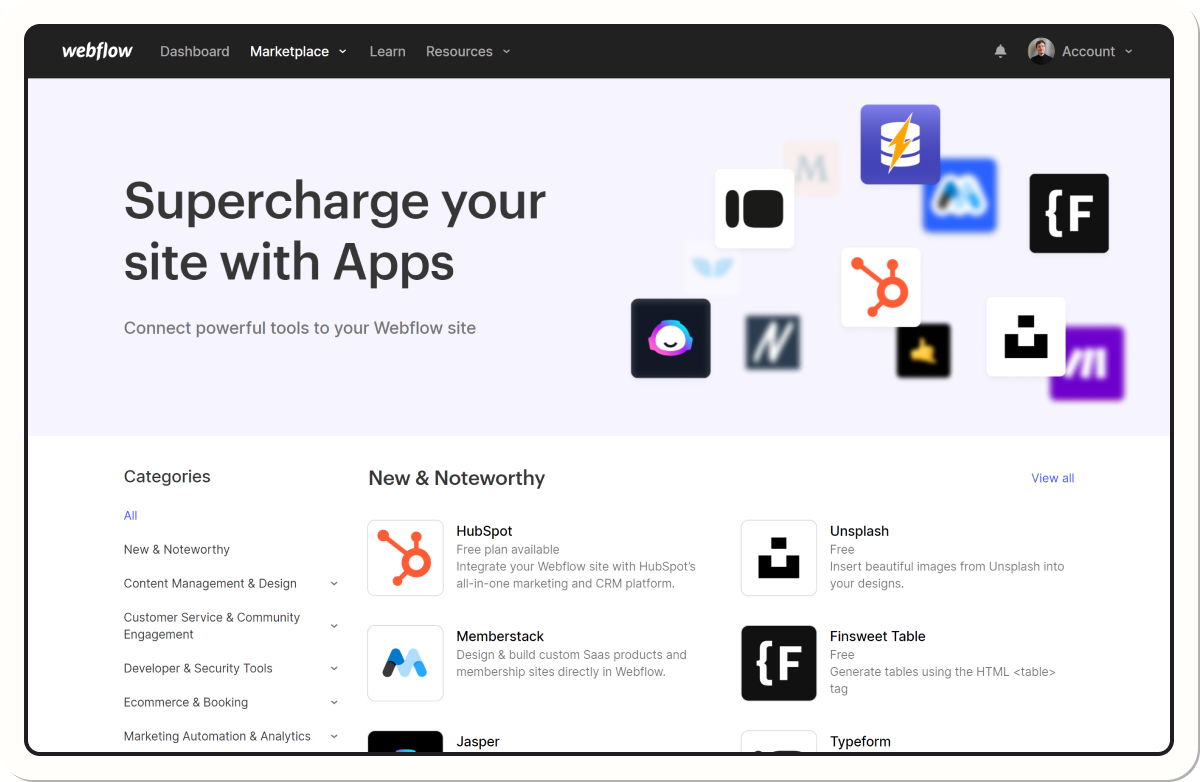
- Logic extensions marketplace 2026 (members, advanced forms)
- Stable REST and GraphQL APIs
- Community > 3 million users
- Annual Webflow Conf event (San Francisco + live Paris)
Framer
- Official plugins are still limited, but Zapier and Make cover the gaps
- The Components API (React) opens the door to custom widgets
- Very active Discord community around motion
The number of resources (clones, tutorials, freelancers) is still much higher on the Webflow side, which makes it easier to build in-house or hire quickly.
7. Pricing 2026: compare TCO, not just the plan
At first glance, Framer seems more affordable. But the lack of native e-commerce and native localization often means extra third-party costs (Shopify + Weglot). By contrast, Webflow brings everything together in one subscription.
For a full budget breakdown (hosting, maintenance, redesign), read “How much does a website cost in 2026?”.
8. Security, maintenance, and scalability
- Webflow hosts on AWS Cloudfront + Fastly, with a free SSL certificate and versioned automatic backups.
- Framer uses the Vercel Edge Network, SSL, and global CDNs, but without a history of multiple backups.
- Both tools handle back-end updates; no server operations are required.
For regulated companies (finance, healthcare), Webflow Enterprise’s SOC 2 Type II certification can be a decisive advantage.
9. Use cases: which tool for which project?
Webflow vs Framer vs WordPress: which tool should you choose in 2026?
Webflow vs WordPress: flexibility, maintenance, and hidden costs
- Webflow:
- no plugin updates,
- fewer security risks on the user side,
- all-in-one (hosting + builder).
- WordPress:
- very flexible through plugins/themes,
- but:
- maintenance,
- security,
- performance to manage.
Framer vs WordPress: launch speed and simplicity
- Framer:
- ultra-fast for a simple/marketing site,
- no technical maintenance.
- WordPress:
- heavier to set up for similar needs.
When is WordPress still the better fit (plugins, massive blog, community)?
- For:
- massive blogs,
- sites with hundreds/thousands of pages,
- specific needs covered by specialized plugins.
Quick decision grid: WordPress, Webflow, or Framer in 2026?
- Framer: landing page / lightweight design-first site.
- Webflow: full professional site (corporate, SaaS + blog, e-commerce).
- WordPress: very large projects, highly specific plugin needs.
Webflow vs Bubble vs Framer: showcase websites, web apps, and no-code SaaS
Webflow vs Bubble: sites vs complex logic applications
- Webflow:
- marketing sites and professional showcase websites.
- Bubble:
- web apps with business logic (dashboards, marketplaces, back office…).
Framer vs Bubble: visual front-end vs advanced business logic
- Framer:
- ultra-designed front end for the visible layer.
- Bubble:
- database + logic + workflows.
When should you combine multiple tools (Bubble for the app, Webflow/Framer for marketing)?
- Very common:
- Bubble for the app,
- Webflow or Framer for the marketing site (landing page, blog, pricing).
Is Webflow still relevant in 2026?
Yes, Webflow is still fully relevant in 2026. It’s actually one of the best solutions for managing a site simply without sacrificing quality: a clear interface for managing content, clean technical structure, reusable components, and room to evolve without rebuilding everything from scratch. Webflow lets marketing, SEO, and product teams work independently, while relying on a solid, high-performing, scalable foundation. So it’s a tool that’s simple day to day, but built to last.
What’s better than Framer for building a website?
Framer alternatives based on project type (showcase site, SaaS, web app)
- Simple showcase website:
- Squarespace, Wix, Carrd can be enough.
- SaaS with lots of pages:
- Webflow (powerful CMS).
- Web app with advanced business logic:
- Bubble, WeWeb + no-code backend.
Framer vs Webflow vs other no-code tools (Wix, Squarespace, Editor X…)
- Framer: premium design, creative marketing sites.
- Webflow: balance of flexibility / CMS / e-commerce / SEO.
- Wix/Squarespace: simplicity, ideal for very non-technical beginners.
- Editor X: a more advanced alternative in the Wix ecosystem.
When should you choose a traditional framework (Next.js, Nuxt, etc.) over no-code?
- When you have:
- complex backend needs,
- custom integrations,
- extreme performance requirements,
- full control over code.
- For most marketing and showcase sites, Webflow or Framer is more than enough.
Webflow vs Framer FAQ
Webflow or Framer: which tool should I choose for my first site if I’m starting from scratch?
Framer will feel simpler and more reassuring for a first simple site or portfolio, especially if you come from design. Webflow becomes more interesting as soon as your project gets more complex.
Can I migrate a Webflow site to Framer (and vice versa) easily?
Not automatically: you need to rebuild the structure and re-import the content. You can export/import content (CSV), but you can’t “convert” a project in one click.
Which tool is best for an e-commerce site: Webflow or Framer?
Webflow, thanks to its native e-commerce. Framer can work for selling a few products through integrations, but it’s not a true full shop.
Are Webflow and Framer suitable for a high-traffic blog?
Webflow is much better suited to a structured, high-traffic blog (CMS, SEO, performance). Framer is better for a lightweight blog that isn’t central to your strategy.
Do you need to know how to code to get the most out of Webflow or Framer in 2026?
No, you can build full sites without coding. Code only becomes useful for very specific needs (scripts, custom integrations, advanced tracking).
Sources
- Official Webflow documentation: https://webflow.com
- Webflow University (tutorials and courses): https://university.webflow.com
- Official Framer Sites documentation: https://www.framer.com/sites/
- Framer blog & product announcements: https://www.framer.com/blog/
- “Webflow vs Framer” community discussions on Reddit:
- r/webflow, r/Framer, r/nocode
- Comparisons and creator feedback:
- No-code designer YouTube channels (Flux Academy, Ran Segall, etc.)
- Specialized articles on no-code and SEO (Webflow, Framer, WordPress)
{usecases}
Good to know
Heading
Lorem ipsum dolor sit amet, consectetur adipiscing elit. Suspendisse varius enim in eros elementum tristique. Duis cursus, mi quis viverra ornare, eros dolor interdum nulla, ut commodo diam libero vitae erat. Aenean faucibus nibh et justo cursus id rutrum lorem imperdiet. Nunc ut sem vitae risus tristique posuere.











Lorem ipsum
Lorem ipsum dolor sit amet, consectetur adipiscing elit, sed do eiusmod tempor incididunt ut labore et dolore magna aliqua. Ut enim ad minim veniam, quis nostrud exercitation ullamco laboris nisi ut aliquip ex ea commodo consequat. Duis aute irure dolor in reprehenderit in voluptate velit esse cillum dolore eu fugiat nulla pariatur.