Webflow vs Webstudio: the 2026 comparison
Webflow and Webstudio deliver on the same promise: building professional websites visually, without sacrificing code quality.
In 2026, the choice between these two tools mostly comes down to ecosystem maturity (Webflow) vs developer-oriented flexibility (Webstudio).
This guide breaks down the differences, shared strengths, use cases, and practical criteria to help you choose one or the other.
Goal: help you make a quick decision based on your profile, budget, and projects.
article summary
- Webflow offers a mature platform with CMS, hosting, collaboration, localization, and a broad ecosystem of agencies and integrations.
- Webstudio is an open-source alternative focused on web standards, reusable components, and deployment within infrastructure you control.
- Webflow is faster to adopt for designers and marketing teams that want to publish without managing a technical pipeline.
- Webstudio is more appealing to developers who want control over code, hosting, a monorepo, or continuous integration.
- Webflow is better suited to traditional marketing sites and blogs, while Webstudio becomes attractive in a headless stack or highly technical product environment.
Want to take it further? Ask:
Webflow vs Webstudio: what are the differences?
Positioning and product philosophy
Webflow is now a very mature solution, widely adopted by designers, marketing teams, and specialized agencies, especially within a specialized Webflow agency that can fully leverage its ecosystem and performance. Webstudio is younger and targets teams that produce clean code, with a philosophy closer to developer workflows (Git, export, fine front-end control).
- Webflow prioritizes an integrated experience (designer + CMS + hosting).
- Webstudio prioritizes technical freedom (export, integration with the rest of your stack).
This difference in positioning often raises the question of whether Webflow is still pure no-code or whether it’s moving closer to low-code, a topic we cover in our analysis of Webflow no-code or low-code.
Design interface and no-code experience
Both offer an advanced visual interface, but with a different approach to complexity.
Major interface differences
- Webflow
- Rich but dense interface, close to a design tool + CSS inspector.
- Very visual “box model” convention, well suited to designers.
- Lots of panels, options, and contextual menus → powerful but intimidating at first.
- Webstudio
- Interface inspired by front-end IDEs and the DOM.
- Logic closer to native HTML/CSS, with less of a “layer on top.”
- Targets people who are comfortable with code structure, even if they don’t write everything by hand.
Technical architecture, hosting, and code export
This is one of the biggest points of divergence.
- Webflow
- Managed hosting (high-performance global CDN).
- Static code export possible (HTML/CSS/JS), but without CMS or e-commerce.
- Closed architecture: no full self-hosting with Webflow CMS.
- Webstudio
- Focuses on exportable, controllable code.
- Built for integration with environments like GitHub + deployment on external platforms.
- Managed hosting available, but the key promise is hosting freedom.
Webflow relies on fully managed Webflow hosting, powered by a high-performance CDN, which greatly simplifies launch and maintenance for non-technical teams.
Architecture / export comparison
CMS, advanced logic, and content management
Webflow is years ahead on native CMS. Webstudio is catching up or relies more on integrations / external solutions.
- Webflow CMS
- Collections, custom fields, relationships.
- Editor for clients, roles, scheduled publishing (on advanced plans).
- Volume limits (number of collections, items).
- Webstudio CMS (2026)
- Features still less extensive than Webflow.
- Often paired with external headless CMSs (Sanity, Contentful, etc.).
- More modular, but less plug and play for non-technical users.
Learning curve and target user profile
The two tools overlap, but the “ideal user” isn’t exactly the same.
Best-fit profiles
- Webflow
- Web designers who want to build sites without a developer.
- No-code agencies, creative studios.
- Marketers with time to learn.
- Webstudio
- Designers with real HTML/CSS/JS knowledge.
- Front-end developers who want to save time on UI.
- Product / tech teams integrating the front end into their Git pipeline.
Summary by profile
Webflow vs Webstudio: what do they have in common?
Summary table of shared points
Visual construction of responsive websites
Both use a block-based visual builder, with multi-breakpoint management.
- Drag & drop, DOM hierarchy, CSS classes.
- Control over margins, grids, flexbox, etc.
- Responsive preview by breakpoint (mobile, tablet, desktop…).
CMS management and dynamic collections
- Webflow: highly integrated native CMS → ideal for blogs, editorial sites, portfolios.
- Webstudio: native CMS + the ability to connect other CMSs (headless).
Concrete common points
- Item collections (articles, projects, products…).
- Dynamic pages based on a template.
- Filters, sorting, pagination.
Animations, interactions, and micro-transitions
Both let you create advanced interactions without writing JS.
Animation capabilities comparison
Forms, on-page SEO, and technical performance
- Native forms in both, connectable to third-party tools (Zapier, Make, CRMs…).
- Management of title tags, meta descriptions, alt tags, ARIA attributes, etc.
- Performance: generated code is generally lightweight, especially when best practices are applied. Webstudio puts particular emphasis on code quality.
Collaboration, teamwork, and publishing workflows
- Webflow: agency-oriented collaborative work (content editor, designer, client).
- Webstudio: collaborative work closer to dev workflows (Git, branches, code reviews).
Key similarities
- Ability to duplicate projects / pages.
- Draft / production environment management.
- Partial or full site publishing.
We’ve written and published many CMS comparisons, and you can find them here:
Webflow vs Webstudio: which tool for which type of project?
Project type decision table
Contrary to popular belief, more and more large companies are adopting Webflow for their marketing sites, as our analysis on why large companies use Webflow shows.
Marketing landing pages and showcase websites
- Webflow
- Many templates, advanced animations.
- Very fast launch with integrated hosting.
- Webstudio
- Excellent control over generated code → performance.
- Ideal if you want to integrate into a monorepo or CI pipeline.
In short: for a simple landing page, Webflow is faster for a pure designer to get up and running; Webstudio is very attractive for a product / dev team.
Blogs, editorial sites, and high-volume content
- Webflow is very good up to a certain threshold (collection, item, and API limits).
- Beyond that (large media, very advanced SEO), many stacks opt for a headless CMS + custom front end → a natural fit for Webstudio.
For standard editorial projects, building a blog on Webflow remains a very effective solution thanks to its native CMS, as long as you stay within reasonable volumes.
E-commerce and conversion funnels
- Webflow e-commerce
- Integrated e-commerce module (products, cart, checkout).
- Functional limits compared with Shopify, but enough for many simple catalogs.
The Webflow e-commerce module is a perfect fit for simple to mid-sized stores, with strong branding needs and an autonomous marketing team.
- Webstudio
- No native e-commerce module this complete yet.
- It relies on integrations: Snipcart, Lemon Squeezy, Stripe Checkout, etc.
Typical recommendation
- Simple store, strong branding, autonomous marketing team → Webflow.
- E-commerce already connected to a custom / headless stack → Webstudio for the front end.
Projects for agencies, freelancers, and studios
- No-code agencies / web design
- Webflow remains the benchmark: market demand, easy hiring around this tech.
- Product / dev studios
- Webstudio makes more sense for building front ends integrated into an existing tech stack, with designer/dev collaboration.
Advanced use cases: light web apps, portals, SaaS marketing
For these cases, the “separate front end + backend” logic is key:
- Webflow
- Possible, but you quickly move beyond “simple no-code” and pile up custom code and integrations.
- Webstudio
- More natural: well-structured front end + API calls + external backend logic.
Webflow vs Webstudio: ease of use, learning, and documentation
User interface, usability, and workflow logic
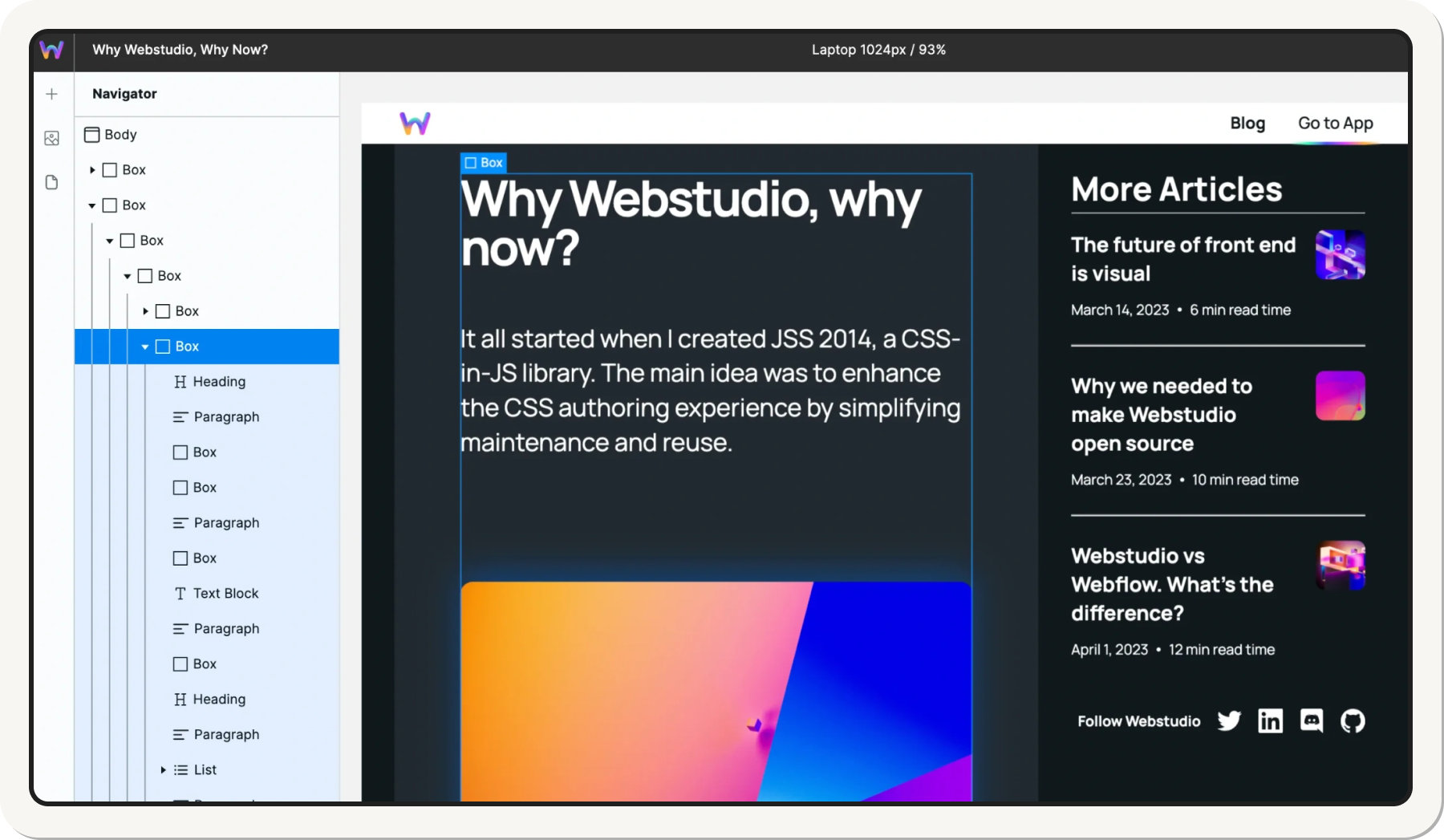
- Webflow: very polished usability, but a lot to get used to.
- Webstudio: rougher, but very clear logic for a dev profile.
Perceived strengths / weaknesses
Tutorials, official documentation, and guides
- Webflow
- Webflow University: global benchmark (videos, courses, docs).
- Community tutorials, YouTube channels, blogs, paid training.
- Webstudio
- Official documentation growing.
- Fewer third-party resources for now → more technical autonomy required.
Communities, external resources, and training
- Webflow: huge community (Slack, Discord, forums, events, Webflow Conf).
- Webstudio: smaller but engaged community, lots of technical discussions (GitHub issues, Discord, Reddit).
Availability of resources
- Templates, clonables, ready-to-use UI components:
- Abundant for Webflow.
- Growing fast but more limited for Webstudio.
Average time to become operational on each tool
Estimate to become “autonomous on a first simple professional site,” starting from scratch and spending a minimum amount of time each week:
Webflow vs Webstudio: no-code features, CMS, and advanced logic
Page structures, global styles, and design system
- Both allow:
- Global styles (typography, colors, spacing).
- Reusable components.
- Setting up a design system.
Main difference: Webstudio often exposes the front end as structured code closer to a dev project, while Webflow feels like a no-code project built for designers.
CMS: collections, relationships, dynamic content
Webflow CMS
- Collections with custom fields.
- Simple / multiple relationships.
- Limits to watch (number of fields, items, etc.).
Webstudio + CMS
- Less turnkey CMS.
- Ideal if you know how to configure a headless CMS and use it via API.
Conditions, filters, conditional logic, and personalization
- Webflow: conditional display logic (show/hide an element based on a condition).
- Webstudio: same logic, plus easier custom code handling (JS, API) for complex cases.
Examples of use cases covered in both tools
- Show a block if a CMS field is filled in.
- List filters (categories, tags).
- Custom messages based on a form’s state.
Multilingual management and localized content
- Webflow: multilingual support possible via:
- Native features (localization) on certain plans.
- Or third-party integrations (Weglot, Localize, etc.).
- Webstudio: often paired with a CMS or external localization solution.
Webflow now offers a native feature dedicated to multilingual management, covered in our guide to Webflow Localization, especially well suited to international marketing sites.
Practical decision
- Simple multilingual project, non-technical team → Webflow is simpler.
- Complex multilingual project, headless stack → Webstudio is more flexible.
Depending on the complexity of the project, it’s entirely possible to build multilingual websites with Webflow, either through native features or with more advanced third-party tools.
Webflow vs Webstudio: performance, SEO, and accessibility
Loading speed, Core Web Vitals, and front-end optimization
Both can produce very fast sites if configured well.
- Webflow:
- Automatic image optimization, basic minification.
- Generally performant loading by default.
- Webstudio:
- Highlights clean, fine-grained code structure.
- Excellent foundation for advanced optimizations (front-end dev).
Beyond the tool itself, SEO performance depends mostly on content structure, technical optimizations, and editorial strategy, elements usually handled by a Webflow SEO agency used to no-code and Core Web Vitals challenges.
Built-in SEO tools (tags, sitemaps, redirects)
Webflow
- Meta tags, Open Graph, canonicals.
- Automatic sitemap.
- 301 redirect management in the interface.
- Control over slugs, breadcrumbs, etc.
Webstudio (2026)
- Tag management and on-page SEO.
- Redirects and sitemaps possible, sometimes more technical (depending on hosting).
- Great playground for advanced SEO via a custom stack.
Accessibility: best practices and each tool’s limits
- Both tools allow:
- Adding alt tags, ARIA attributes, roles.
- Structuring the DOM (Hx headings, lists, etc.).
- Accessibility is still primarily a design and development responsibility, not just a tool issue.
Good to know
Heading
Lorem ipsum dolor sit amet, consectetur adipiscing elit. Suspendisse varius enim in eros elementum tristique. Duis cursus, mi quis viverra ornare, eros dolor interdum nulla, ut commodo diam libero vitae erat. Aenean faucibus nibh et justo cursus id rutrum lorem imperdiet. Nunc ut sem vitae risus tristique posuere.












Lorem ipsum
Lorem ipsum dolor sit amet, consectetur adipiscing elit, sed do eiusmod tempor incididunt ut labore et dolore magna aliqua. Ut enim ad minim veniam, quis nostrud exercitation ullamco laboris nisi ut aliquip ex ea commodo consequat. Duis aute irure dolor in reprehenderit in voluptate velit esse cillum dolore eu fugiat nulla pariatur.