Add structured data to your Webflow site?

Video
Why add structured data?
Adding structured data to your website can be useful for several reasons, and Gemeos, a Webflow SEO agency, breaks it down below and shows you how to do it easily
1. Help search engines understand your website content more easily
That can improve your ranking in search results and increase your click-through rate (CTR).
By using structured data tags to describe your website content, search engines can surface rich snippets, product carousels, location cards, and other rich features depending on the type of data you provide.
That helps grab users' attention. You can also find the 9 steps to optimize your Webflow website for SEO in this article.
2. Help your website visitors find the information they're looking for more easily.
By providing organized, hierarchical information about products, events, reviews, and other types of content, you can help visitors quickly find what they're looking for on your website.
3. Help optimize the user experience.
By providing clear, organized information, you can make navigation on your website smoother and more intuitive for visitors, which can improve their overall experience and increase engagement with your website.
That said, it's important to note that rich snippets don't guarantee a high position in search results. They're mainly a way to improve how information appears in search results and attract more user attention. Even if that sometimes helps you reach position zero.
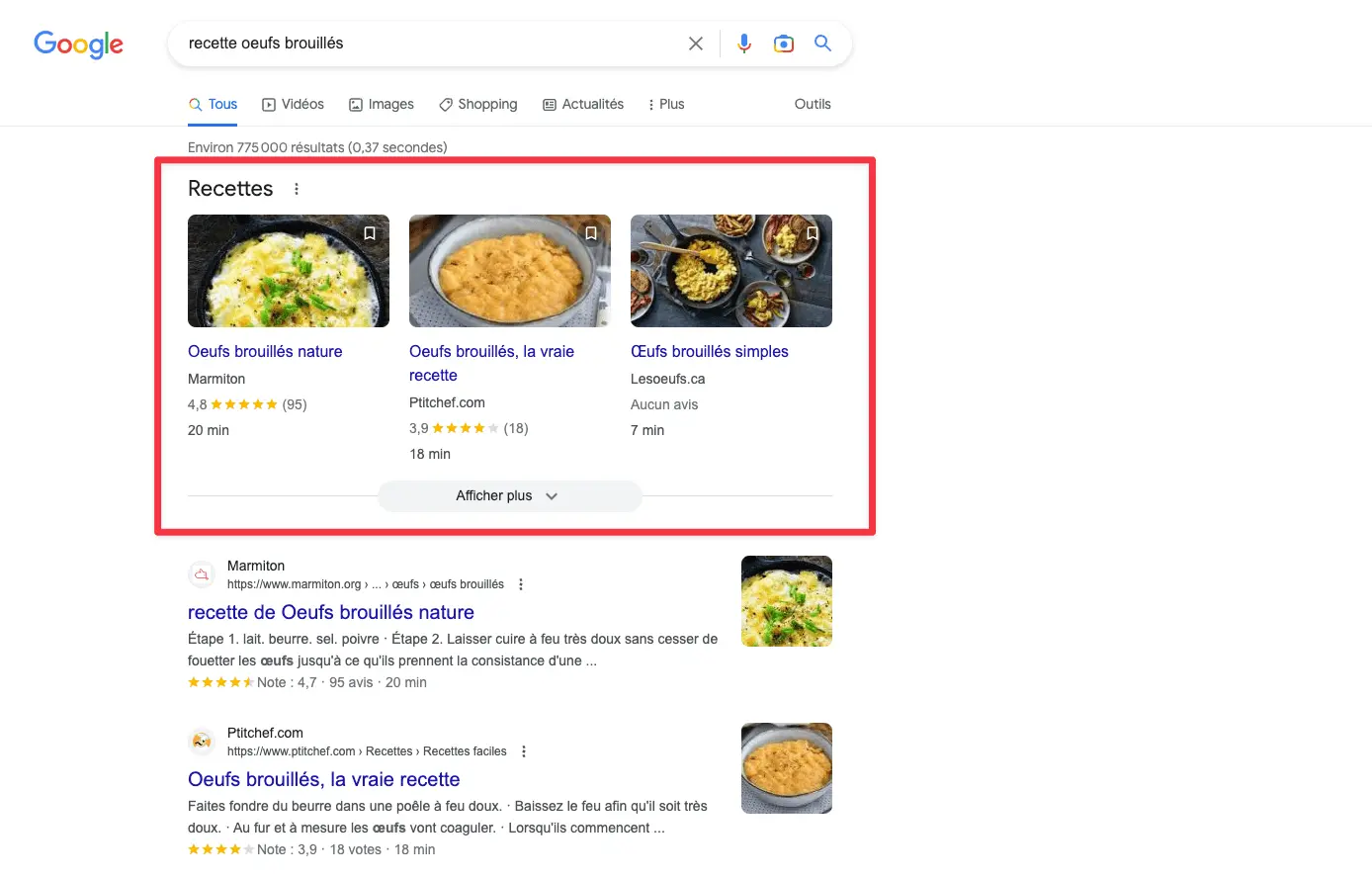
1. Define and retrieve the code snippet to add to your page
Rich snippets are generated from structured data that is included on the web page using specific tags. Search engines use algorithms to analyze your web page content and identify structured data.
They then use that data to generate rich snippets in search results.
You can do it in 2 ways:
- Use Google's tool
- Use ChatGPT
The code snippet should look like this:
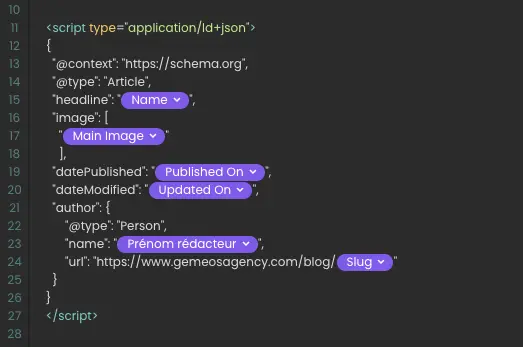
Using structured data in a blog is one of the most common use cases. Feel free to copy and paste the code below to save time.
 < script type="application/ld+json">
    {
      "@context": "https://schema.org",
      "@type": "NewsArticle",
      "headline": "Title of a News Article",
      "image": [
        "https://example.com/photos/1x1/photo.jpg",
        "https://example.com/photos/4x3/photo.jpg",
        "https://example.com/photos/16x9/photo.jpg"
       ],
      "datePublished": "2015-02-05T08:00:00+08:00",
      "dateModified": "2015-02-05T09:20:00+08:00",
      "author": [{
          "@type": "Person",
          "name": "Jane Doe",
          "url": "https://example.com/profile/janedoe123"
        },{
          "@type": "Person",
          "name": "John Doe",
          "url": "https://example.com/profile/johndoe123"
      }]
    }
2. Add the custom code in the <head> tag of your page
By adding the structured data tags in the "head" section of your page, you make sure that this information is available across the entire page, which helps search engines find it easily.
3. Replace the elements with your variables
If you're using structured data to describe a blog post, you can include variables to replace the article title, publication date, author name, and other relevant information for each blog page. This makes the structured data more accurate and better suited to each blog page.
So don't hesitate to make the data dynamic with the values from your CMS collection!

3. Publish your site and you're done

4. Bonus tip - Test whether Google recognizes them properly
Go to the Google testing tool to check that your page is eligible for rich results.
Copy and paste your page URL and test the result

Adding structured data on Webflow - what you need to remember
| Key steps / Sections | Details |
|---|---|
| Why add structured data? | - Makes it easier for search engines to understand your content, improves rankings and click-through rate (CTR), and can generate rich snippets (e.g. rich results) - Helps visitors find the information they want faster - Improves the user experience with a clear presentation - Note: rich snippets aren't guaranteed, but they can lead to position zero |
| Step 1: Generate the JSON-LD code | - Use Google or ChatGPT to create JSON-LD - Example: NewsArticle type (title, image, date, author...) |
| Step 2: Add the code to the head | - Paste the JSON-LD into the |
| Step 3: Replace with dynamic fields | - For CMS pages: replace static data with Webflow fields (e.g. {{cms-title}}) |
| Step 4: Publish the site | - Publish your site to activate structured data |
| Bonus: Test with Google | - Use the Rich Results Test tool to check eligibility for rich snippets |
Good to know
Heading
Lorem ipsum dolor sit amet, consectetur adipiscing elit. Suspendisse varius enim in eros elementum tristique. Duis cursus, mi quis viverra ornare, eros dolor interdum nulla, ut commodo diam libero vitae erat. Aenean faucibus nibh et justo cursus id rutrum lorem imperdiet. Nunc ut sem vitae risus tristique posuere.













Lorem ipsum
Lorem ipsum dolor sit amet, consectetur adipiscing elit, sed do eiusmod tempor incididunt ut labore et dolore magna aliqua. Ut enim ad minim veniam, quis nostrud exercitation ullamco laboris nisi ut aliquip ex ea commodo consequat. Duis aute irure dolor in reprehenderit in voluptate velit esse cillum dolore eu fugiat nulla pariatur.