Structured Data: The Complete 2026 Guide (Schema.org, JSON-LD, Rich Snippets, and AI)
Structured data is standardized markup, most often written in JSON-LD and based on the Schema.org vocabulary, that explicitly describes a page's content to machines: ‘this is a product, at this price, rated 4.6/5.’
It is not a direct ranking factor. It can make a page eligible for certain enhanced Google features and provide explicit information about its content. For Google's AI features in Search, no special Schema.org markup is required: structured data remains primarily useful for traditional SEO when it matches the visible content.
.avif)
article summary
- Structured data describes a page's content in a standardized format that machines can understand.
- Google supports JSON-LD, Microdata, and RDFa, with JSON-LD generally recommended because it is easier to maintain.
- Valid markup can make a page eligible for certain rich results, without guaranteeing that they will appear or directly improving rankings.
- The types you should deploy depend on the actual content: Product, Article, Breadcrumb, Organization, LocalBusiness, Event, Video, or other compatible types depending on the site.
- In 2026, FAQ rich results are deprecated in Google Search and HowTo is no longer supported; no special Schema.org markup is required for AI Overviews or AI Mode.
Want to take it further? Ask:
What is structured data?
In SEO, structured data refers to a block of information added to a web page's code to describe its content explicitly and in a standardized way. Where visible text says ‘Solid oak chair: €249: 4.6/5 (128 reviews)’, structured data tells the machine: @type: Product, name: Solid oak chair, offers.price: 249, aggregateRating.ratingValue: 4.6, reviewCount: 128. The content does not change for the user. Its machine readability changes dramatically.
The most accurate analogy is a product label. Without a label, a robot has to infer information from the image and free text: it often succeeds, but with some uncertainty. With a standardized label—reference, price, weight, composition—it no longer guesses; it reads. Structured data plays exactly this role: it removes ambiguity during crawling and indexing.
Google is clear on this point in its Search Central documentation: markup helps it understand the page and makes that page eligible for specific search features. It is a readability contract, not a ranking lever.
Structured, semi-structured, and unstructured data: what is the difference?
The term can be confusing because it has two meanings. In data and BI, ‘structured data’ means data organized according to a predefined schema, typically a relational database or CSV file. In SEO, it refers to semantic markup on a web page. Both meanings share the same underlying idea: a predictable format that a machine can interpret without guesswork.
- Unstructured data: free text, an image, a video, or an audio recording. There is no explicit schema. Search engines have to interpret the content.
- Semi-structured data: content accompanied by metadata or hierarchy without a rigid schema, such as XML, JSON, or an email with headers. Schema.org markup technically belongs to this family.
- Structured data: a strict schema, typed fields, and expected values, such as a SQL table, CSV file, or product feed.
In SEO, ‘structured data’ commonly refers to Schema.org markup. That is the meaning used throughout this guide.
What is Schema.org and who governs it?
Schema.org is the shared vocabulary that gives markup a common meaning. Launched in 2011 by Google, Microsoft (Bing), Yahoo, and Yandex, it defines a collection of types—Product, Article, Event, Organization, Person, Recipe, and more—and, for each type, a list of allowed properties. Product accepts name, sku, brand, offers, and aggregateRating. Event accepts startDate, location, and performer. The vocabulary is open, versioned, and updated several times a year.
You need to distinguish two levels. Schema.org is the dictionary: all available terms. Google's documentation is the subset that Google actually uses to display rich results, with its own required-property rules. Markup can be perfectly valid according to Schema.org and still be useless for a Google feature. This is the first source of disappointment for teams that deploy markup without reading the requirements for each feature.
Three concepts appear constantly and are worth defining now. Markup is the code added to the page to carry the description. JSON-LD (JavaScript Object Notation for Linked Data) is the recommended writing format: a standalone JSON object inside a script tag, independent from the visible HTML. An entity is something uniquely identifiable—your company, a product, a person, a place—that markup can name, type, and connect to other sources using properties such as sameAs or @id.
Concrete example: a product page with and without markup
Take a typical ecommerce product page. Without markup, Google sees an <h1>, paragraphs, a number followed by a euro symbol, and stars rendered in CSS. It can often infer that the page is probably about a product, but it does not inherently know whether the displayed price includes tax, whether the product is in stock, or whether the 4.6 rating refers to the product or the store.
With this markup, the ambiguity disappears:
{ "@context": "https://schema.org", "@type": "Product", "name": "Oslo Solid Oak Chair", "sku": "CH-OSLO-001", "brand": { "@type": "Brand", "name": "Atelier Nord" }, "offers": { "@type": "Offer", "price": "249.00", "priceCurrency": "EUR", "availability": "https://schema.org/InStock", "url": "https://example.com/oslo-chair" }, "aggregateRating": { "@type": "AggregateRating", "ratingValue": "4.6", "reviewCount": "128" }}
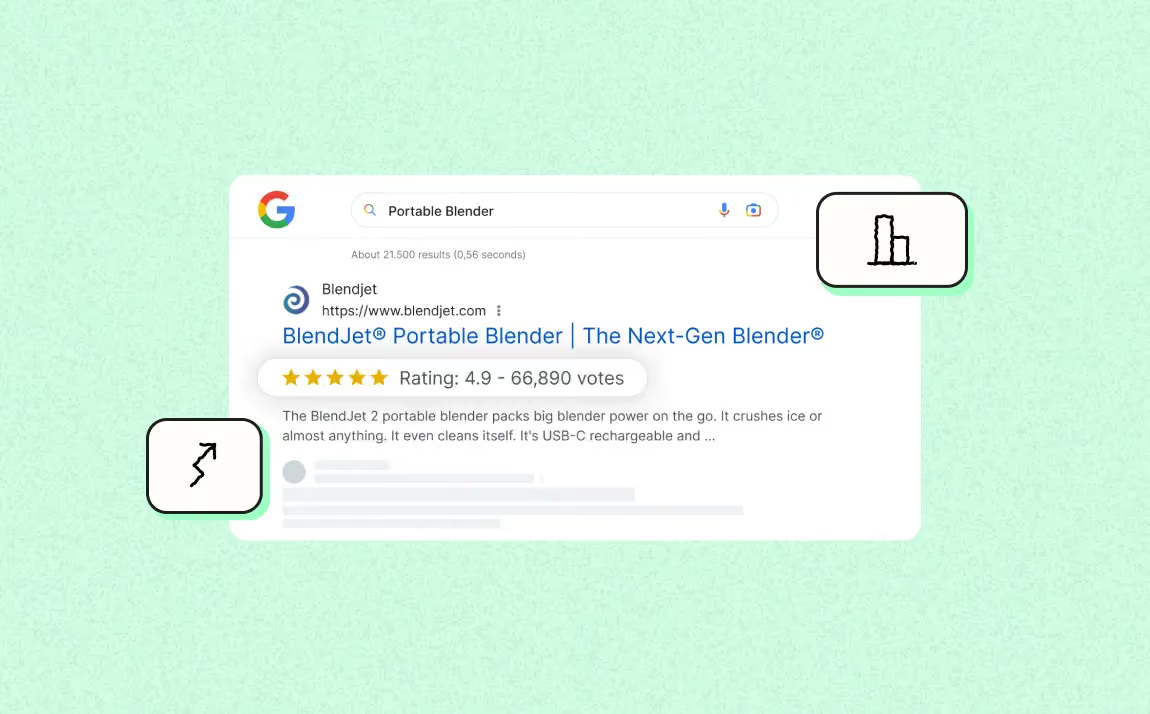
Possible SERP result: price, availability, or reviews may appear when the feature is available and the page is eligible. Google still decides whether to display them, and the impact on CTR varies by query and the actual presentation of the result.
What is structured data used for in SEO?
Many articles simply claim that ‘structured data improves SEO.’ That is both partly true and lazy. Here is what it actually does—and what it does not do.
Make a page eligible for rich results
The most tangible benefit is eligibility for certain enhanced features supported by Google: product information, breadcrumbs, events, recipes, job postings, or videos, depending on the case. The markup must comply with the properties and rules of the targeted feature, but its presence never guarantees display.
Some formats go beyond the standard snippet: product or recipe carousels, grouped event results, and video thumbnails in the Videos tab. All rely on valid markup that complies with the requirements of the relevant feature.
Improve click-through rate without gaining positions
A rich result can change how a result is presented and encourage more interaction, but its effect depends on the type of query, the displayed result, and the industry. Google has published case studies showing gains for some sites, but those results cannot be generalized to every implementation.
Any effect should mainly be measured in Search Console, by comparing the relevant pages and search appearances before and after deployment. Do not automatically attribute a traffic change to markup if other changes happened at the same time.
Help Google understand your entity (Knowledge Graph)
Organization markup on your homepage, combined with sameAs links to official profiles such as LinkedIn, Wikidata, and social networks and a stable @id, helps Google consolidate a coherent entity representation in its Knowledge Graph. This markup gives Google explicit information about the organization and can help connect consistent representations of the same entity.
For Google's AI features in Search, Google states that no special Schema.org markup is required. Structured data should primarily remain accurate and consistent with the visible content on the page.
Is structured data a ranking factor?
No. Google has repeated this many times: structured data is not a direct ranking factor. Adding well-implemented Article markup will not move a page from position 14 to position 4.
Its main role is to provide explicit information about content and, when a type is supported, make the page eligible for enhanced search features. It should not be presented as a way to directly improve rankings or trigger AI visibility.
JSON-LD, Microdata, or RDFa: which format should you choose?
Three syntaxes can express the Schema.org vocabulary. The answer fits in one line: use JSON-LD. Here is why.
Microdata directly annotates visible HTML using itemscope, itemtype, and itemprop attributes. RDFa (Resource Description Framework in Attributes) does the same with vocab, typeof, and property, following the semantic-web tradition. Both work, but they couple semantic markup to the HTML structure: a template redesign can silently break the semantics.
The same product in Microdata:
<div itemscope itemtype="https://schema.org/Product"> <h1 itemprop="name">Oslo Solid Oak Chair</h1> <div itemprop="offers" itemscope itemtype="https://schema.org/Offer"> <span itemprop="price" content="249.00">€249</span> <meta itemprop="priceCurrency" content="EUR"> </div></div>
Verbose, fragile, and DOM-dependent. JSON-LD separates markup from visible HTML, which generally makes maintenance easier. If a site already uses Microdata or RDFa correctly, migration is not mandatory: Google supports all three formats.
What structured-data types exist, and which ones should you prioritize?
Schema.org offers a much broader vocabulary than the structured-data features supported by Google Search. The useful question is therefore not ‘what can we mark up?’ but ‘which types genuinely match the content and the intended use?’
Types that can generate a rich result in Google
These types can, under certain conditions, trigger a visible SERP feature:
- Product / Offer / AggregateRating / Review: can provide price, availability, and review information when Google's requirements are met.
- BreadcrumbList: helps Google represent a page's position in the site hierarchy.
- Article / NewsArticle / BlogPosting: helps Google better understand the title, images, dates, and author. Article markup is not required to be eligible for Google News or Top Stories.
- Event: dates, locations, ticketing, with possible grouped display.
- Recipe: rating, preparation time, calories, image—one of the most visual rich-result formats.
- JobPosting: integration into Google's job-search experience.
- VideoObject: video thumbnail, key moments, and indexing in the Videos tab.
- LocalBusiness: business information, opening hours, and address, supporting local search visibility.
- SoftwareApplication: ratings and pricing for applications and SaaS tools.
Types that are useful even without a rich snippet (Organization, WebSite, Person, sameAs)
Some markup mainly serves to explicitly describe an organization, person, or website without necessarily producing a specific SERP display.
- Organization: describes company identity with properties such as name, logo, address, contact details, or certain identifiers.
- WebSite: website name and, where applicable, an internal search action. Helps Google distinguish the site name from its domain.
- WebPage: types the page and connects it to the publishing entity.
- Person: can describe an author, executive, or expert when the page genuinely represents that person.
- sameAs and @id: sameAs can connect an entity to other URLs that represent it, while @id lets you reuse a stable identifier across multiple structured objects.
These properties can help describe an organization, person, or website consistently. However, they do not guarantee citation in a generative engine.
Prioritization matrix by site type (SaaS, ecommerce, media, local service, corporate site)
Below are the types to examine first for each site category. This matrix does not replace Google's documentation: a type is valuable only if it matches the content genuinely visible on the page and, for a rich result, a feature that is still supported.
Ecommerce
Start with Product and Offer on product pages, then BreadcrumbList for navigation and Organization for company information. Depending on the business model, properties related to variants, shipping, returns, and loyalty programs can complete the setup. Structured data does not replace Merchant Center when that channel is relevant.
B2B SaaS
Organization and BreadcrumbList provide a useful foundation. SoftwareApplication is relevant only when the page genuinely describes an application and meets the feature requirements. Editorial content can use Article or BlogPosting when appropriate to the page type. For expert or author profiles, ProfilePage can be considered when the page meets Google's expected definition.
Media or blog
Article, NewsArticle, or BlogPosting can provide explicit information about the title, images, dates, and author. BreadcrumbList helps represent hierarchy. Organization and, depending on the page, ProfilePage can complement publisher and contributor identification. Above all, keep dates, authors, and images consistent with what users see.
Local service
LocalBusiness is the priority when the page genuinely represents a physical location or local business and the relevant properties are available. Organization and BreadcrumbList complement the global markup. Do not add a type simply because it seems close to your business: always check that Google supports it for the intended use.
Corporate or agency website
Organization, BreadcrumbList, and Article on editorial content generally cover the most common needs. Add other types only when the page genuinely matches their definition and the data can be maintained over time.
The FAQPage and HowTo case in 2026
The strategy has changed. Google stopped showing HowTo rich results in 2023. FAQ rich results were then deprecated in Google Search starting May 7, 2026. FAQPage and HowTo should therefore no longer be presented as SERP-visibility levers for a standard website.
You can keep Schema.org markup if another system uses it and it accurately describes the content, but you should not assign it a Google benefit that no longer exists. For an editorial FAQ, the priority remains a readable structure and useful answers, without depending on a rich result.
How to add structured data to a page in 6 steps
1. Choose the feature and type that genuinely fit
Start with Google's gallery of structured data supported in Search, then open the documentation for the target type. Check that the feature still exists, that it matches the page content, and that your site meets any specific requirements.
2. List required and recommended properties
Fill in every property required for eligibility and add recommended properties only when the corresponding information genuinely exists in the content. Never invent a rating, price, availability status, date, or identity just to complete the markup.
3. Generate JSON-LD that matches the visible content
JSON-LD is generally the easiest format to maintain, although Google also supports Microdata and RDFa. Markup values must match information visible or accessible to the user. Use stable identifiers when connecting multiple objects, for example an Organization reused with the same @id.
4. Add the markup to the page or template
A JSON-LD block can be placed in the head or body. Google can also read JSON-LD injected dynamically with JavaScript when the content is correctly rendered and accessible. In a CMS, generate values from actual page fields rather than relying on manual copy-and-paste that cannot be maintained at scale.
5. Validate before production
The Rich Results Test checks eligibility for supported Google features and flags corresponding errors or warnings. The Schema Markup Validator checks broader compliance with the Schema.org vocabulary. The two tools answer different questions and complement each other.
6. Deploy to a sample and verify Google's rendered version
Start with a few representative pages, then use URL Inspection to check the version Google sees. Once the deployment is validated, extend the markup to the relevant templates. Requesting indexing or submitting a sitemap can facilitate discovery, but guarantees neither indexation nor the display of a rich result.
How to deploy structured data at scale
At scale, the quality of the data model matters more than the number of markup blocks. Markup should be generated from a reliable source and follow the same rules as the visible content.
Generate markup from the CMS
Map every Schema.org property to a real field: name, price, image, author, date, address, or availability. If a value is missing, define an explicit rule rather than injecting fictional data. Conditional fields prevent publishing empty or inconsistent properties.
Reuse stable identifiers
For recurring entities such as the organization or an author, use stable, consistent @id values across the site. The goal is to connect objects cleanly, not multiply contradictory versions of the same entity.
Test by template
Build a sample for each template: in-stock product, unavailable product, article with author, updated article, location with opening hours, page without optional data. Testing by scenario limits errors before they spread to hundreds or thousands of URLs.
Version changes
Treat markup like code. Document source fields, conditional rules, and template changes. A front-end, CMS, or product-feed update can silently break JSON-LD if nobody monitors dependencies.
Which structured-data mistakes should you avoid?
- Declaring information that is absent from or different from the visible content.
- Adding fake reviews, ratings, prices, availability, or authors.
- Using a type that does not match the page's main content.
- Omitting required properties for the targeted Google feature.
- Generating multiple contradictory blocks for the same entity.
- Leaving outdated dates, currencies, URLs, or identifiers after an update.
- Blocking the page from Googlebot or applying noindex while expecting a rich result.
- Deploying a template across the whole site without testing several real scenarios.
- Confusing Schema.org validation with eligibility for a Google rich result.
- Presenting deprecated markup as a feature that is still active in Google Search.
How to test and monitor structured data
Checks should happen before and after deployment. No single tool covers Schema.org syntax, Google eligibility, page rendering, and potential manual actions all at once.
Rich Results Test
Use it for types and features supported by Google Search. It shows detected items, critical errors, and recommended properties when the feature exposes them.
Schema Markup Validator
Use it to check Schema.org vocabulary and structure beyond Google rich results alone. Markup can be valid in Schema.org without being used by a Google feature.
URL Inspection and Search Console
URL Inspection lets you check how Google sees a page. Search Console can then flag issues for certain supported appearances or enhancements and also shows manual actions when a structured-data issue violates guidelines.
Is structured data useful for AI engines?
For Google AI Overviews and AI Mode, Google states that no special Schema.org markup is required and that sites should not overinvest in structured data specifically for AI. The fundamentals remain the same: accessible, useful, original content that can be indexed correctly and stays consistent with the structured information on the page.
For other assistants or engines, retrieval and citation mechanisms differ and evolve quickly. It is therefore reasonable to maintain accurate, maintainable structured data, but not to promise that a schema, sameAs, or @id will trigger a citation in ChatGPT, Perplexity, or another system.
Checklist before publishing structured data
- The type matches the main content and current documentation.
- Required properties for the targeted feature are present.
- Any recommended properties you add correspond to real information.
- Structured data matches the visible content on the page.
- URLs, images, dates, prices, and identifiers are up to date.
- The markup is valid in the tool appropriate to the objective.
- The page is accessible to Googlebot and is not blocked by noindex.
- The template has been tested across several representative cases.
- The deployment can be maintained when CMS data changes.
- No rich result or AI benefit is presented as guaranteed.
Conclusion
Structured data is a descriptive layer, not a shortcut to better rankings. In 2026, the right strategy is to choose types that are genuinely supported and relevant to the content, use accurate and maintainable markup, validate the rendered output, and monitor Search Console. Features evolve: the deprecation of FAQ rich results is a reminder that deployments should follow current documentation rather than a fixed checklist.
FAQ
Does structured data directly improve Google rankings?
No. Its presence is not a direct ranking factor. It provides explicit information about the page and can make content eligible for certain search features when a type is supported.
Which format should you choose: JSON-LD, Microdata, or RDFa?
Google supports all three formats. JSON-LD is generally the easiest to implement and maintain, which is why it is recommended in most configurations.
Where should JSON-LD be placed?
A JSON-LD block can be placed in the page head or body. Google can also read JSON-LD data injected dynamically with JavaScript when the page remains accessible and the markup is correctly rendered.
Why does my rich result not appear even though the test is valid?
Because validation only makes the page eligible. Google never guarantees that a rich result will be displayed. The page must also comply with general guidelines, feature-specific rules, and remain accessible to Google.
Is FAQPage still useful for obtaining a rich result?
Not for Google Search in 2026: the FAQ rich-result feature was deprecated starting May 7, 2026. FAQPage markup can be retained for other uses if it accurately describes the content, but it should no longer be implemented solely to obtain an FAQ display in Google.
Do you need special structured data for AI Overviews or AI Mode?
No. Google states that no special Schema.org markup is required for its generative AI features. Standard structured data remains useful when it accurately describes the page and supports search features that Google actually uses.
Good to know
Heading
Lorem ipsum dolor sit amet, consectetur adipiscing elit. Suspendisse varius enim in eros elementum tristique. Duis cursus, mi quis viverra ornare, eros dolor interdum nulla, ut commodo diam libero vitae erat. Aenean faucibus nibh et justo cursus id rutrum lorem imperdiet. Nunc ut sem vitae risus tristique posuere.

.avif)








Lorem ipsum
Lorem ipsum dolor sit amet, consectetur adipiscing elit, sed do eiusmod tempor incididunt ut labore et dolore magna aliqua. Ut enim ad minim veniam, quis nostrud exercitation ullamco laboris nisi ut aliquip ex ea commodo consequat. Duis aute irure dolor in reprehenderit in voluptate velit esse cillum dolore eu fugiat nulla pariatur.