Rich Snippets: Definition, Types, and How to Get Them in 2026
A rich snippet, or rich result, is an enhanced Google result presentation that can display additional information when a search feature supports the page's structured data. Valid markup makes the page eligible, but Google never guarantees display. The right approach is to choose a currently supported type, add structured data consistent with visible content, then validate it with the appropriate tools.
article summary
- A rich snippet is an enhanced presentation of a Google result made possible by certain supported structured data.
- Markup makes a page eligible for a feature; Google never guarantees that it will be displayed.
- JSON-LD is generally the easiest format to maintain, but Google also supports Microdata and RDFa.
- In 2026, FAQ rich results are deprecated and HowTo is no longer supported in Google Search.
- No special Schema.org markup is required for AI Overviews or AI Mode; structured data should above all remain accurate and consistent with visible content.
Want to take it further? Ask:
What exactly is a rich snippet?
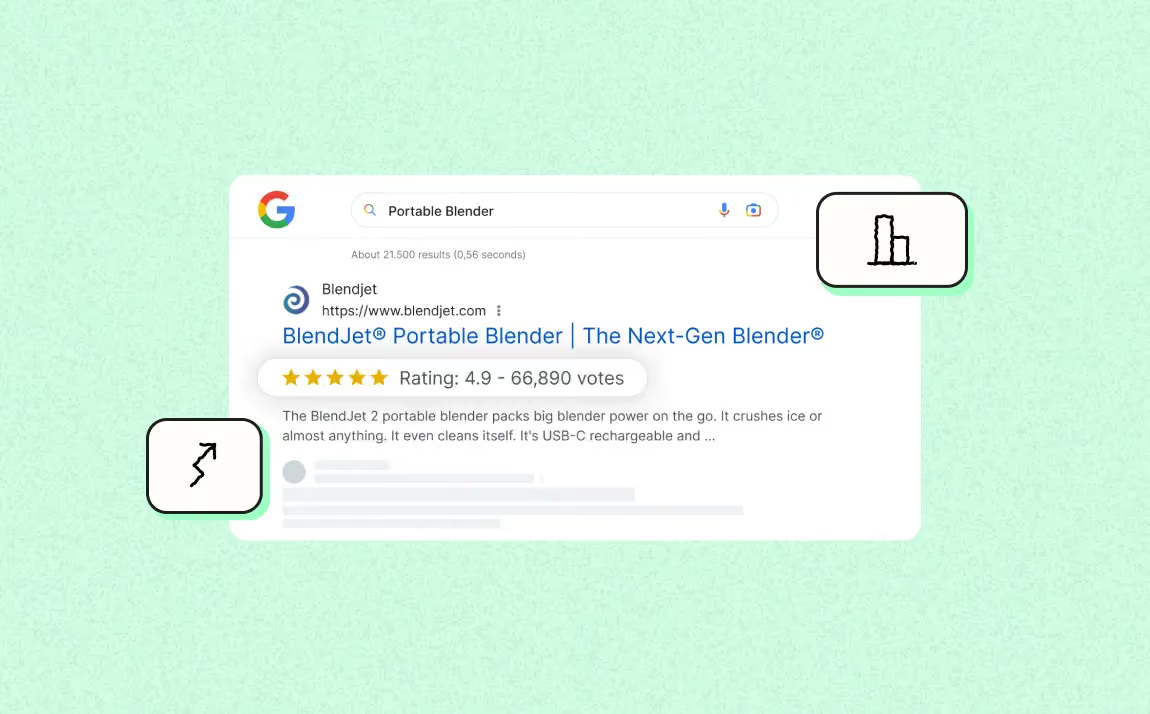
A rich snippet is a search result enhanced with additional information that Google may display based on supported structured data. A standard result typically shows a title, URL, and descriptive snippet; an enhanced presentation may add, depending on the feature, a rating, price, availability, image, preparation time, event date, or breadcrumb.
The SERP—the search engine results page—now combines text results, images, videos, local modules, ads, and generative features. A rich result can therefore stand out visually, without any guarantee of a higher click-through rate.
One terminology point is worth clarifying. Google mainly uses the term ‘rich result’ in its current documentation. ‘Rich snippet’ remains common SEO terminology; however, when checking supported features, it is better to refer to Google's documentation on rich results.
Rich snippet, rich result, rich card: what is the difference?
These three terms cover closely related concepts, which explains the ongoing confusion. Here is the useful distinction.
- Rich snippet: Historical term that is still widely used. Refers to a standard organic result enhanced with visual elements derived from structured data.
- Rich result: Google's current official term. It has a broader scope: it includes classic enhanced snippets as well as more immersive formats such as carousels, hotels, recipe grids, or job listings in Google for Jobs.
- Rich card: an older term used for certain card-based formats, especially on mobile. In current documentation, Google generally groups these experiences under the broader concept of rich results.
In practice, if you say ‘rich snippet’ to a developer or SEO consultant, everyone will understand. If you are looking for official documentation, search for ‘rich results.’
Rich snippet vs. featured snippet: do not confuse them
This is the most common confusion, and it has practical consequences for content strategy. The two formats have different origins, mechanics, and optimization levers.
- Rich snippet: Origin: Schema.org structured data placed in the code by the website publisher.
- Rich snippet: Position: remains in its place in the organic rankings, simply with an enhanced visual presentation.
- Rich snippet: Lever: technical. Add valid, compliant JSON-LD markup.
- Rich snippet: Control: partial. You provide the data; Google decides whether to show it.
- Featured snippet: Origin: automatic extraction of a passage from visible content by Google's algorithm, without any special markup.
- Featured snippet: Position: a special box where Google highlights an answer excerpt, depending on the query and SERP presentation.
- Featured snippet: Lever: editorial. Structure content so a paragraph, list, or table answers the question directly.
- Featured snippet: Control: almost none. No markup can trigger it.
The practical difference lies in the lever: rich results rely on supported structured data, while featured snippets come from algorithmic extraction of visible content.
Rich snippets vs. AI Overview and knowledge panel
Two other formats make the modern SERP harder to interpret.
The knowledge panel presents information about an entity using Google's Knowledge Graph and sources Google considers reliable. Consistent Organization or Person structured data can help Google understand certain entity information, but it does not by itself trigger a knowledge panel.
AI Overviews and AI Mode are generative features distinct from rich results. Google states that no special Schema.org markup is required to appear in them. Structured data should mainly remain consistent with visible content and continue supporting search features that use it.
Finally, the meta description is not a rich snippet. It gives Google descriptive text that it may use or replace with an excerpt considered more relevant to the query. It does not depend on Schema.org.
How does a rich snippet work on Google's side?
A rich result never appears by magic. It is the outcome of a four-stage technical chain, and any stage can fail.
It all starts with crawling: Googlebot downloads the page, executes JavaScript when necessary, and retrieves the rendered source. Next comes parsing: the engine detects the structured markup and converts it into usable entities and properties. Then comes eligibility: Google checks that the markup meets the required properties for the declared type, general quality guidelines, and consistency with content visible to users. Finally comes display, which remains an algorithmic decision made query by query.
Structured data uses a standardized vocabulary, notably Schema.org, to explicitly describe certain information on a page: price, average rating, publication date, or author. It helps search engines interpret these elements when a supported feature can use them, without replacing analysis of visible content. How Schema.org structured data works should therefore be distinguished from the rich result itself.
The most important distinction is this: valid markup, eligibility, and display are three different stages. Markup can pass the tests without a rich result appearing. Google chooses the final presentation according to its systems and the rules of the feature; markup provides eligibility, not guaranteed display.
JSON-LD, Microdata, RDFa: which format should you choose?
Three syntaxes can implement structured data supported by Google. In most projects, JSON-LD is the easiest to maintain, without making Microdata or RDFa invalid.
- JSON-LD: a structured-data block placed inside a <script type="application/ld+json"> tag. Google accepts it in the <head> or <body> and recommends it because it is easy to implement and maintain.
- Microdata: HTML attributes (itemscope, itemtype, itemprop) inserted directly into content tags. It works, but every template redesign risks breaking the markup.
- RDFa: syntax based on HTML attributes such as vocab, typeof, and property. It remains supported by Google when the markup is valid and complies with the documentation for the feature.
For a new deployment, JSON-LD is generally a good maintenance choice. @context declares the vocabulary used and @type the nature of the object being described. The essential point remains compliance with the documentation for the targeted feature and consistency with visible content.
Required vs. recommended properties
Each rich-result type has its own list of properties, divided by Google into two categories.
For a given feature, required properties determine eligibility. Their list varies by type and changes with Google's documentation. Always check the current requirements for Product, Recipe, Event, or any other feature at deployment time rather than reusing a fixed list.
Recommended properties can provide additional useful information when they genuinely apply to the content. Their absence does not have the same status as a missing required property. Add them only when they are accurate and maintainable; a recommended property does not guarantee that a specific visual element will be shown.
Operational rule: fix errors that block eligibility first, then review warnings according to their relevance to the content and feature. Never fill in a property solely to make a warning disappear.
What rich snippet types are available in 2026?
Google supports several search features based on structured data, and the list evolves. You therefore need to distinguish currently documented features from older deprecated formats.
The main types still supported in 2026
- Product: Product and Offer can make product information eligible for enhanced presentations, with possibilities varying according to the page type, supplied properties, and related Google programs. In Webflow, a Schema.org Product rich snippet can be populated from actual CMS fields to reduce inconsistencies.
- Reviews and ratings: Schema.org: Review / AggregateRating. What can appear: stars and number of ratings. For: products, software, courses, books, movies, recipes, local businesses. 2026 status: active, but limited to a closed set of host types; self-serving reviews on a service page or homepage are not eligible.
- Breadcrumbs: BreadcrumbList helps Google understand a page's position in the hierarchy and can contribute to displaying a navigation path in results.
- Recipe: Schema.org: Recipe. What can appear: image, rating, preparation time, calories, and eligibility for recipe carousels. For: food websites and food brands. 2026 status: active and highly visual.
- Event: Schema.org: Event. What can appear: dates, location, status (online, postponed, canceled). For: ticketing sites, venues, organizers, training providers, webinars. 2026 status: active.
- Video: VideoObject helps Google understand the video, thumbnail, duration, and other relevant metadata. This information can contribute to its presentation in supported video surfaces without guaranteeing any particular display.
- Job posting: JobPosting can make a job listing eligible for employment-related search experiences when required information is present and compliant with Google's rules.
- Local business: LocalBusiness lets you provide structured information about a local company when the page and properties meet the applicable requirements.
- Article: Article, NewsArticle, and BlogPosting provide structured information about editorial content, including title, images, dates, and author. Google can use this data to better understand the page and its editorial information without guaranteeing a specific visual format in the SERP. In a Webflow CMS, Article Schema.org markup can be connected to editorial fields to keep information consistent.
Deprecated or removed types to know in 2026
FAQPage: Google stopped displaying FAQ rich results in Google Search starting May 7, 2026. Existing FAQ markup can remain in the code if it accurately describes the content, but it should no longer be implemented solely to obtain this display.
HowTo: HowTo rich results have not been shown in Google Search since 2023. The markup can still exist for other uses if it genuinely describes the content, but it should no longer be presented as a Google rich-result lever.
When Google removes or deprecates a feature, the right reflex is to return to the official gallery of supported structured data before maintaining a deployment solely for SERP visibility.
Which rich snippet should you prioritize for your type of site?
Ecommerce: start with Product and Offer on product pages, then BreadcrumbList for hierarchy. Shipping, returns, availability, or loyalty information can complement the setup when it genuinely exists and is supported.
B2B SaaS: BreadcrumbList, Organization, and structured data suited to editorial content often form the foundation. SoftwareApplication is relevant only when the page genuinely describes an application according to the feature's criteria.
Media or blog: Article, NewsArticle, or BlogPosting can structure editorial information. BreadcrumbList helps Google understand hierarchy. Author and publisher data should remain consistent with visible information.
Local business: LocalBusiness is relevant when the page genuinely represents a physical location or local activity and applicable properties can be populated with accurate data.
Corporate or agency website: Organization, BreadcrumbList, and Article on editorial content cover many common needs. Do not add a type only because it seems close to your activity.
Do rich snippets really improve click-through rate?
A rich result can change how a result is presented and draw more attention, but there is no universal CTR uplift. The effect depends on query type, the format actually displayed, position, competition, and demand.
The right approach is to measure the relevant pages before and after deployment in Search Console, looking at impressions, clicks, CTR, and, where the report allows it, search appearances. Avoid automatically attributing an increase or decrease to markup if other changes were made at the same time.
How to get a rich snippet in 6 steps
1. Check that the feature still exists
Start with Google's current gallery of supported structured data. Old documentation, a plugin, or a blog post may continue recommending a format that is no longer displayed.
2. Choose the type that genuinely matches the content
Markup should describe what users see. A product page uses Product, a recipe uses Recipe, and an event uses Event. Do not use a type simply because it offers an attractive display.
3. Fill in required and relevant properties
Open the feature documentation and complete the required properties. Add recommended properties only when they genuinely exist on the page. Never create fake reviews, prices, authors, availability, or dates.
4. Implement structured data
JSON-LD is generally the easiest format to maintain, although Google also supports Microdata and RDFa. In a CMS, generate values from actual fields rather than manually duplicating information.
5. Test the markup
Use the Rich Results Test to check eligibility for supported Google features. The Schema Markup Validator provides broader validation against the Schema.org vocabulary. Passing validation does not guarantee display.
6. Deploy and monitor
Start with a few representative pages, check the rendered output with URL Inspection, then expand the deployment. Monitor Search Console and any reported errors for supported features.
Why is my rich snippet not showing?
Valid markup may still produce no rich result. To diagnose the issue, check the causes in this order.
1. The feature is no longer supported
FAQPage and HowTo illustrate this case. If Google has removed the feature, no code fix will make it reappear.
2. The markup contains a blocking error
The Rich Results Test flags critical errors. Fix required properties or invalid values first.
3. Visible content does not match the structured data
A price, rating, date, or availability status declared in JSON-LD must reflect the page. An inconsistency can make the markup ineligible and, in some cases, expose the site to a manual action.
4. The page is not properly accessible or indexable
Check the HTTP status, noindex directives, robots.txt, canonical, and the version rendered by Google. A rich result requires Google to access the page and process its content.
5. The page is eligible but Google chooses not to show the format
This is normal behavior. Google never guarantees that an enhanced feature will appear for every query, on every device, or for every eligible page.
6. The site has a structured-data spam issue
Check the Manual Actions report in Search Console if you suspect misleading or abusive markup. Fix the content and data before requesting reconsideration.
How to test and track rich results
The Rich Results Test checks a URL or code snippet for supported Google features. The Schema Markup Validator more broadly checks Schema.org syntax and vocabulary. URL Inspection then lets you see how Google processes the rendered page.
In Search Console, use available reports for the relevant features and monitor errors, valid pages, and changes after deployment. To measure business impact, connect search data to conversions or sales rather than focusing only on the number of detected rich results.
Rich snippets and generative engines: what is their real role?
Rich snippets are Google Search features; they are not a citation mechanism in ChatGPT, Perplexity, or other assistants. For AI Overviews and AI Mode, Google states that no special Schema.org markup is required.
Structured data remains useful when it accurately describes content and supports search features that use it. For generative visibility, focus mainly on page accessibility, information quality, clear entities, evidence, and sources. No Schema.org type guarantees inclusion or citation by a generative engine. A GEO audit can then measure the brand's and content's actual observed presence in these environments.
Checklist before targeting a rich snippet
- The feature is still present in Google's current documentation.
- The Schema.org type matches the page's main content.
- All required properties for the feature are present.
- Values exactly match information visible or accessible to users.
- The markup passes the Rich Results Test without critical errors.
- The page is accessible, indexable, and canonical.
- The deployment is tested across several real template scenarios.
- The data can be maintained as the content or CMS evolves.
- No ranking, CTR, or AI-visibility gain is presented as guaranteed.
- Search Console monitoring is planned after publication.
Conclusion
A rich snippet is an opportunity to enhance how a result is presented, not a promise. In 2026, the priority is to check that the feature still exists, use a type suited to the content, maintain accurate data, and test eligibility. The deprecation of FAQ and the removal of HowTo show why a structured-data strategy must follow current Google documentation rather than a fixed checklist.
FAQ about rich snippets
Does a rich snippet improve Google rankings?
No. Structured data is not a direct ranking factor. It can make a page eligible for an enhanced presentation, which may change the result's visibility, but it cannot guarantee a better position.
How long does it take for a rich snippet to appear?
There is no guaranteed time frame. Google must crawl and process the page, then decide whether to show the feature according to the query and its systems. A page can remain eligible without ever displaying a rich result.
Why is the Rich Results Test valid but nothing appears in Google?
Because the test mainly confirms that the page can be eligible for the feature. Final display remains at Google's discretion and can vary by query, device, and context.
Can FAQPage still generate a rich snippet in 2026?
No. Google deprecated the FAQ rich result in Google Search starting May 7, 2026. FAQPage should no longer be implemented solely to obtain that display.
Is HowTo still displayed as a rich result?
No. Google stopped displaying HowTo rich results in 2023.
Do you need special markup to appear in AI Overviews?
No. Google states that no special Schema.org markup is required for AI Overviews or AI Mode. Standard structured data simply needs to remain consistent with visible content and the features it relates to.
Good to know
Heading
Lorem ipsum dolor sit amet, consectetur adipiscing elit. Suspendisse varius enim in eros elementum tristique. Duis cursus, mi quis viverra ornare, eros dolor interdum nulla, ut commodo diam libero vitae erat. Aenean faucibus nibh et justo cursus id rutrum lorem imperdiet. Nunc ut sem vitae risus tristique posuere.










Lorem ipsum
Lorem ipsum dolor sit amet, consectetur adipiscing elit, sed do eiusmod tempor incididunt ut labore et dolore magna aliqua. Ut enim ad minim veniam, quis nostrud exercitation ullamco laboris nisi ut aliquip ex ea commodo consequat. Duis aute irure dolor in reprehenderit in voluptate velit esse cillum dolore eu fugiat nulla pariatur.

.avif)