SEO Site Architecture: The Complete Method for Structuring Your Website
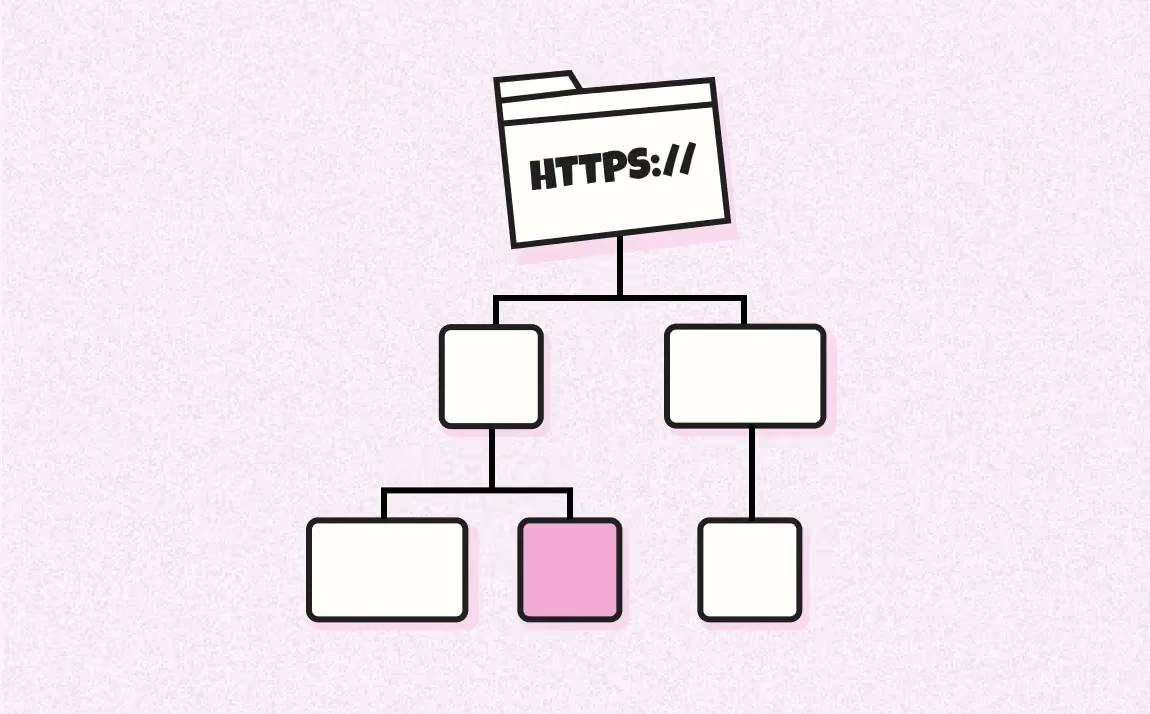
An SEO site architecture is the logical hierarchy of a website's pages, organized by topic and search intent, from the homepage down to the deepest pages. Its role is to help Google crawl and understand the entire website, concentrate internal PageRank on strategic pages, and guide users in as few clicks as possible. A good architecture reduces unnecessary depth, prevents orphan pages and connects every page to a clearly understandable topical group, without imposing a universal click-depth rule.
article summary
- SEO site architecture is not the navigation menu: it is the logical plan of the website, while the menu is only one visible expression of it.
- It should be built after keyword research and intent clustering, never from the company organizational chart.
- Technical objective: limit unnecessary depth, avoid orphan pages, clarify relationships between pages and keep URLs readable.
- Recommended structure: Homepage → thematic silos (pillar pages) → child pages → long-tail pages.
- Three concepts to distinguish: architecture (the structure), silo (topical isolation) and semantic cocoon (conversion-oriented semantic internal linking).
Want to take it further? Ask:
What Is SEO Site Architecture (and How Is It Different from the Navigation Menu)?
SEO site architecture is the hierarchical plan of your website: which pages exist, how they are grouped by topic, and which pages depend on which. It is also called SEO website architecture or SEO site structure. For an SEO agency, this organization connects search intents, priority pages and the user journey within a coherent structure.
This plan comes before everything else. The menu, URLs, breadcrumbs and internal linking are simply concrete expressions of this hierarchy. Building a website without a formalized architecture means stacking pages and hoping Google will guess their role. It does not guess: it crawls, evaluates and ranks.
The 3 Levels of a Site Architecture: Homepage, Silos and Child Pages
A readable architecture mainly aims to avoid unnecessary levels. The right number of levels depends on the size of the site, its categories and its actual user journeys. Here is a typical structure for a service agency:
- N0: Homepage: the entry point that distributes authority toward the main silos. It targets the brand and overall positioning.
- N1: Thematic silos (pillar pages): one page for each major business topic. For example /webflow-website-development/, /seo/, /growth/. Each pillar page covers a broad or strategic topic and organizes access to more specific pages.
- N2: Child pages: the subtopics within a silo. Under /seo/, you might find /seo/technical-audit/, /seo/netlinking/, /seo/local-seo/. They target more specific queries, often with commercial intent.
- N3: Long-tail pages: blog posts, case studies, resources or localized pages. They answer more specific needs and can strengthen internal linking toward pillar pages when a link is genuinely relevant.
Click depth, meaning the minimum number of clicks required from an important entry page to reach a URL, should be monitored. Google does not impose an official threshold: a strategic page primarily needs relevant internal links and should remain easy for both users and crawlers to discover.
Site Architecture, Menu, URL Structure and Internal Linking: What Sets Them Apart?
These four concepts are connected, which is precisely why they are often confused. Here is the operational distinction:
A website can have a coherent architecture but an overloaded menu that dilutes access to strategic pages. The opposite also happens: a clean menu can hide orphan pages or pages attached to the wrong section. Work on the logical structure first, then adapt the navigation interface.
Why SEO Site Architecture Influences Visibility (Crawl, PageRank and Relevance)
Four mechanisms explain why poorly structured architecture can limit the discovery and prominence of important pages.
Crawling and Indexing: Why Deep Pages Need Monitoring
Googlebot discovers and revisits URLs partly by following internal links. On large websites, Google adapts its crawling resources to server capacity and crawl demand. A deep page with few links, or one buried among many low-value URLs, may therefore be discovered or revisited less easily than a page that is well integrated into the internal linking structure.
On large sites, faceted navigation, parameters, pagination and low-value URLs can multiply crawl paths. Analyze crawl data, incoming internal links and indexing reports before attributing a problem to depth alone.
Distributing Internal PageRank to Strategic Pages
Internal links help distribute importance between pages. The homepage and other strongly linked URLs can pass some of that importance toward strategic sections. Site architecture and internal linking therefore determine which link paths support priority pages.
A clear structure makes it easier to direct more internal links toward priority pages. Conversely, disorganized architecture can scatter links across secondary pages, tags or archives with little strategic value. Compare the internal links received by your business pages with their actual importance in the user journey.
Topical Authority: Connecting Complementary Content
A page exists within a website, an internal-linking system and a wider body of content. Grouping genuinely complementary resources around a topic can make the subject easier to understand, improve navigation and strengthen the distribution of internal links. This does not mean that publishing a specific number of pages guarantees better rankings.
This logic is often associated with topical authority. In practice, coherence and usefulness matter more than a content quota: publish the pages required to address important intents, then connect them logically.
The final mechanism is user experience. A readable architecture helps visitors find information, an offer or the next step in their journey faster. Measure its effect with indicators suited to your site, such as navigation paths, exits, conversions or internal-search usage, without automatically inferring a direct ranking effect.
Site Architecture, SEO Silos and Semantic Cocoons: What Is the Difference?
This is one of the most persistent sources of confusion in French-speaking SEO. Here is the distinction.
The SEO Silo: Isolate to Strengthen
An SEO silo groups pages that cover the same topic and prioritizes internal links within that group. A page about link building links to other SEO pages, not to an “interface design” page. The objective is to make each section of the site unambiguous in terms of topic.
In practice, there are strict silos, which are highly closed, and flexible silos, which allow cross-links when they are genuinely useful to the reader. On a living website, the flexible model is often easier to maintain without blocking relevant user journeys.
The Semantic Cocoon: A More Advanced French-Speaking Model
Theorized by Laurent Bourrelly, the semantic cocoon is an internal-linking architecture built not around the website's organizational logic, but around the user's mental journey: from a vague need to a purchase decision. Each pillar page addresses a specific target audience, child pages cover sub-needs, and sibling links support lateral navigation between related problems.
This approach requires detailed intent mapping and internal-link governance. Whenever a new page is added, check its place in the journey, its incoming and outgoing links and the consistency of the topical group.
The Topic Cluster: The Pillar + Supporting Content Model
A topic cluster is built around a pillar page and supporting content that explores related subtopics, with useful links between the pillar and the supporting pages. This model can work well for editorial, B2B or SaaS sites because it stays readable as new content is added, but its value still depends on search demand and the site's overall structure.
How to Build an SEO Site Architecture in 7 Steps
The method below follows seven steps. For each one, it specifies the inputs, the action, the expected output and useful tools.
Step 1: Map Real Demand with Keyword Research
Input: your offer, personas and competitors. Tools: Semrush, Ahrefs, SE Ranking or Google Keyword Planner, complemented by the Google Search Console Performance report.
Collect a sufficiently broad set of queries: current performance, competitor keywords, suggestions, related questions, sales-team language and business data. Do not filter solely by search volume: a low-volume query can still be strategic if it reflects an intent close to conversion.
Output: a raw file containing keyword / volume / difficulty / currently ranking URL.
Step 2: Cluster by Intent, Not by Apparent Topic
Input: the file from step 1. Tools: Google Sheets, a SERP clustering tool, or ChatGPT for an initial grouping pass.
Group keywords that share the same intent and similar search results. URL overlap is a useful signal, but there is no universal threshold: also check the types of pages and angles appearing in the results. Then qualify each cluster by intent: informational, commercial, transactional or navigational. This determines the page type: a transactional cluster becomes a service page, while an informational cluster becomes an article.
This work can be formalized through an SEO semantic audit before being translated into a page structure. It also connects directly with your SEO content strategy: site architecture is its structural expression.
Output: intent clusters, each associated with an existing page, a page to create or a page to consolidate.
Step 3: Decide What Should Become a Silo
Input: the clusters. Action: decide the level of each page.
Review the following decision criteria:
- A cluster can become a level-one silo when it represents an independent business or editorial universe and justifies several useful subpages.
- A cluster becomes a child page when it carries an intent sufficiently distinct from its parent to deserve a standalone answer, regardless of any fixed volume threshold.
- If the intent does not justify a standalone page, cover it within a section of the parent page. This reduces redundant content and cannibalization risk.
- The number of top-level silos depends on the offer and the breadth of the site. Keep only universes that are distinct enough to remain understandable in both navigation and structure.
Output: a provisional three-level hierarchy.
Step 4: Visualize the Architecture as a Mind Map
Input: the provisional hierarchy. Tools: Xmind, Whimsical, FigJam or Miro.
The mind map reveals unbalanced branches and unnecessary levels. If a branch contains almost no content, check whether it really deserves a dedicated level. Conversely, if a category accumulates many pages that are difficult to browse, consider an intermediate level based on a clear intent or subtopic.
Output: a shareable diagram validated with marketing and sales teams.
Step 5: Define URL Naming Conventions
Input: the validated architecture. Action: define simple, consistent and stable URL conventions.
Our conventions:
- Use lowercase slugs, words separated by hyphens, with no accents or special characters.
- Reflect hierarchy in directories when it improves readability, without creating unnecessary levels.
- Avoid dates, IDs or unnecessary words when there is no reason to include them.
- Use a short, descriptive and stable slug; do not add words simply to meet a keyword-density target.
- Keep the blog in a dedicated /blog/ directory and connect it to silos through internal linking, not through the URL structure.
Output: a page ↔ target URL mapping table.
Step 6: Build Internal Linking and Breadcrumbs
Input: the mapping table. Action: define priority navigation paths and internal links. Breadcrumbs should remain consistent with the hierarchy when used, and sibling pages should only link to one another when the link genuinely helps the reader.
Internal linking should not become mechanical. A child page does not need an exact-match anchor to its parent every time, and a pillar page does not need to list every descendant in a generic block if the context does not justify it. Prioritize links integrated naturally into paragraphs and navigation modules that are actually useful.
Output: a map of priority links, parent pages and navigation paths.
Step 7: Audit the Structure Before Launch
Input: the mind map, URL list and internal-linking plan. Tools: Screaming Frog, Sitebulb or an equivalent crawler, complemented by Search Console for an existing website.
Check orphan pages, click depth, the number of internal links received, redirects, canonicals, pages blocked by mistake and links to non-final URLs. During a redesign, compare the old and new structures before launch and prepare the required 301 redirects.
Output: a validated architecture, URL matrix and list of corrections before publication.
How to Audit an Existing SEO Site Architecture
Start with a full crawl of the website. For each URL, export its HTTP status, depth, incoming links, canonical, indexability status and directory. Then combine this data with Search Console to identify pages receiving impressions, important URLs missing from internal linking and sections that generate many low-value pages.
The most useful checks include:
- important pages with very few internal links;
- orphan pages present in the sitemap or Search Console but absent from the internal crawl;
- redirect chains and internal links pointing to redirected URLs;
- categories or tags with no clear purpose;
- multiple pages targeting the same intent;
- unusually high depth for high-value pages;
- facets and parameters generating many crawlable URLs without an SEO need.
Measure changes after a redesign with comparable indicators: indexation coverage for priority pages, internal links received, depth, clicks and impressions by directory, crawl errors and conversions on business pages. Do not automatically attribute a traffic change to architecture: also compare content, redirects, demand and search-engine updates.
Example SEO Site Architecture for a Brochure Website
- Home
- Services
- Service A
- Service B
- Industries
- Industry A
- Industry B
- Resources
- Guides
- Case studies
- About
- Contact
The goal is not to copy this structure exactly, but to separate commercial, industry-specific and informational intents. Every page should have an identifiable role and links toward the next steps in the user journey.
Example for an E-commerce Website
On an e-commerce site, architecture is often built around categories, subcategories and products. Facets should be decided according to real demand: some combinations may justify an indexable page, while others should remain navigation filters. Pagination, out-of-stock products, variants and empty categories should be incorporated into the model from the design stage.
Avoid creating an SEO page for every filter combination. A page should become indexable only if it answers a distinct intent, contains relevant content and products, receives internal links and provides genuine value compared with its parent category.
SEO Site Architecture During a Website Redesign
A redesign is the riskiest time to change structure. Before launch, build a complete inventory of existing URLs, identify those that retain their role, those that will be merged and those that will disappear. Prepare 301 mappings toward the most relevant destination, update internal links, canonicals and sitemaps, then crawl the staging website again.
Do not redirect every old URL to the homepage. A redirect should preserve the intent and content of the original page as closely as possible.
Multilingual SEO Site Architecture
For an international website, start by choosing a market structure: subdirectories, subdomains or separate domains depending on project constraints. Language versions should retain a coherent structure when offers are comparable, but there is no need to create artificial equivalents for pages that have no relevance in a given market.
Hreflang annotations connect alternative versions of a page; they do not replace site architecture or internal linking. Also check canonicals, language navigation and the presence of important versions in sitemaps.
Which Tools Should You Use to Build SEO Site Architecture?
A spreadsheet is useful for a keyword, intent, URL, parent and status matrix. Xmind, Miro, FigJam or Whimsical help visualize the hierarchy. Screaming Frog, Sitebulb, Oncrawl or Botify can audit an existing structure depending on site size. Search Console provides visibility and indexing data. No tool can decide the right segmentation for you: that decision depends on intent, business priorities and the search results.
Site Architecture, GEO and Generative Search Engines
A clear architecture can help search engines and assistants discover connected pages and understand relationships between topics, but it does not guarantee citations in a generative engine. For GEO, focus on self-contained pages, explicit definitions, evidence, attributable data and internal linking that makes important resources easy to discover.
Breadcrumbs and BreadcrumbList structured data can make a navigation hierarchy explicit when they accurately reflect the page. An XML sitemap helps search engines discover URLs intended for indexing. An HTML sitemap can help users on some sites, but it is not mandatory. As for llms.txt, do not present it as a requirement or a guaranteed visibility lever: its use depends on the services involved and it does not replace normal content accessibility.
SEO Site Architecture Mistakes to Avoid
- replicating the company's internal organization instead of user intents;
- creating a page for every keyword variation;
- multiplying categories without distinct content or demand;
- leaving important pages without internal links;
- changing URLs during a redesign without a redirect mapping;
- enforcing sealed silos that prevent useful links;
- automatically indexing every e-commerce facet;
- confusing a short URL with good site architecture.
Conclusion
Effective SEO site architecture translates search intents and business priorities into an understandable page structure. It reduces orphan pages, supports internal linking and makes redesigns safer. Build it from real needs, audit it with crawl data and Search Console, then evolve it as your offer or search demand changes.
FAQ
How Many Levels Should an SEO Site Architecture Have?
There is no universal number. Aim for the simplest structure that covers your offers and search intents without adding unnecessary levels. Strategic pages should remain easy to discover and well linked internally.
Do You Need to Follow the Three-Click Rule?
Not as an algorithmic rule. Three clicks is a simplicity heuristic, not an official Google threshold. Focus primarily on internal links, navigation and the relative depth of priority pages.
What Is the Difference Between Site Architecture and Internal Linking?
Site architecture describes the logical organization of pages. Internal linking refers to the links that actually connect them. A good architecture can still be poorly executed if the links do not reflect the intended structure.
Should the Hierarchy Appear in URLs?
Not necessarily. A readable and stable URL is enough. Directories can help organize a website and reporting, but Google does not require the URL path to reproduce navigation depth exactly.
How Do You Know Whether a Topic Deserves Its Own URL?
Check whether it addresses a distinct intent, whether search results show a standalone page type, whether the content can be genuinely useful and whether the page has a clear role in the user journey and internal linking.
Good to know
Heading
Lorem ipsum dolor sit amet, consectetur adipiscing elit. Suspendisse varius enim in eros elementum tristique. Duis cursus, mi quis viverra ornare, eros dolor interdum nulla, ut commodo diam libero vitae erat. Aenean faucibus nibh et justo cursus id rutrum lorem imperdiet. Nunc ut sem vitae risus tristique posuere.











Lorem ipsum
Lorem ipsum dolor sit amet, consectetur adipiscing elit, sed do eiusmod tempor incididunt ut labore et dolore magna aliqua. Ut enim ad minim veniam, quis nostrud exercitation ullamco laboris nisi ut aliquip ex ea commodo consequat. Duis aute irure dolor in reprehenderit in voluptate velit esse cillum dolore eu fugiat nulla pariatur.

.avif)