
 Projects
 Our Offers
 Dedicated team
 Blog
Blog Academy
 About Us
Development5 min read
Translating and Localizing Your Site with Webflow Localization
In an increasingly connected world, translating and localizing your website has become essential if you want to reach international audiences. Webflow, a platform known for its flexibility and power in web design, recently introduced "Webflow Localization," which makes the process much simpler. In this article, Gemeos, a Webflow agency, shares the benefits of translation, what localization actually involves, and how to get the most out of Webflow Localization.
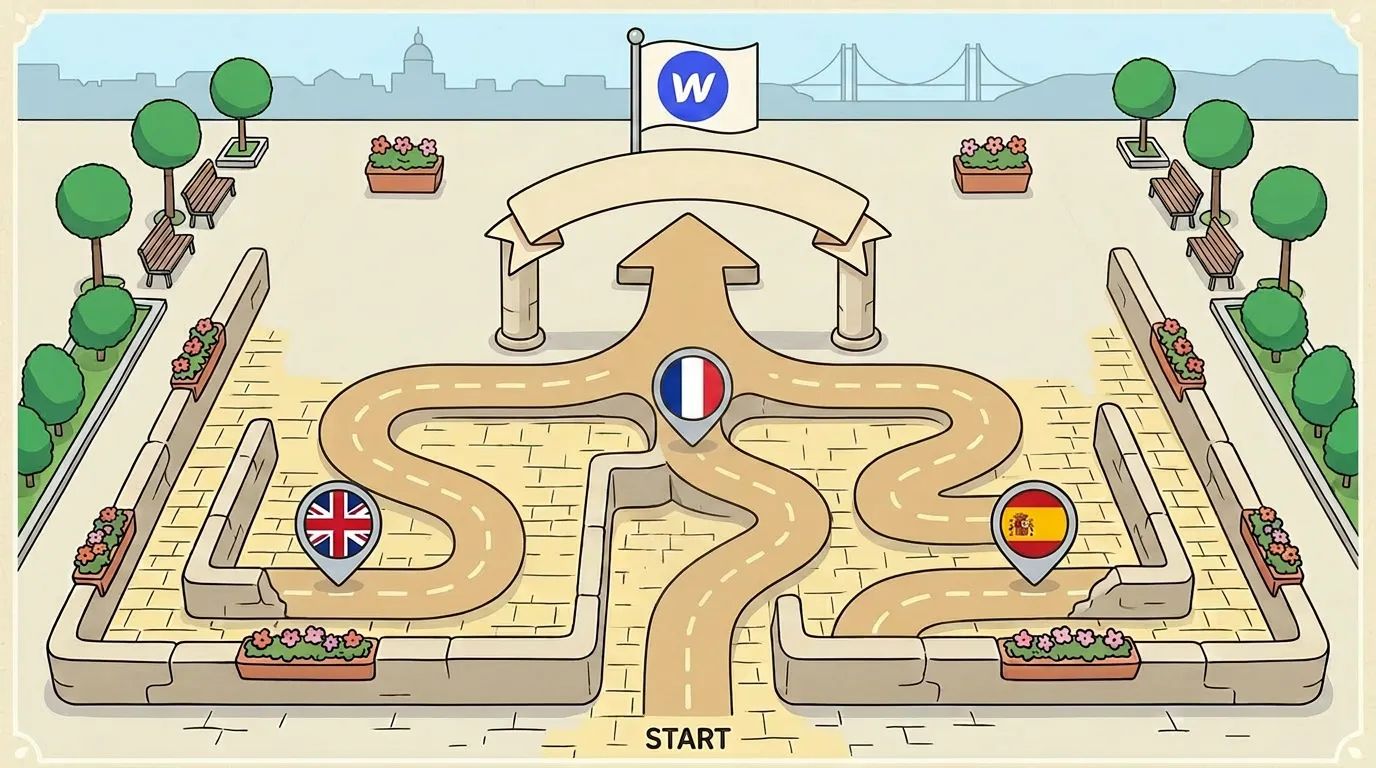
Why localize your website?
Website localization means adapting your site so it’s relevant to specific audiences, based on their language, culture, and local habits. It goes beyond simple translation, with visual, structural, and interactive adjustments that create a consistent, engaging user experience in every region.
Take Airbnb, for example. It localizes its offers and content by region. The French Airbnb site features offers tailored specifically to French travelers, using the local language, with listings relevant to popular destinations in France and a tone that matches local habits. This kind of localization not only serves users better, it also improves conversion by making information easier to access.
Whether you’re a startup or a more established company, localizing your site can help you reach new markets and improve your international organic search performance (SEO). Our Webflow SEO agency can help with that.
Webflow and localization: How does it work?
Webflow Localization is simple and intuitive to set up. Here’s how it works:
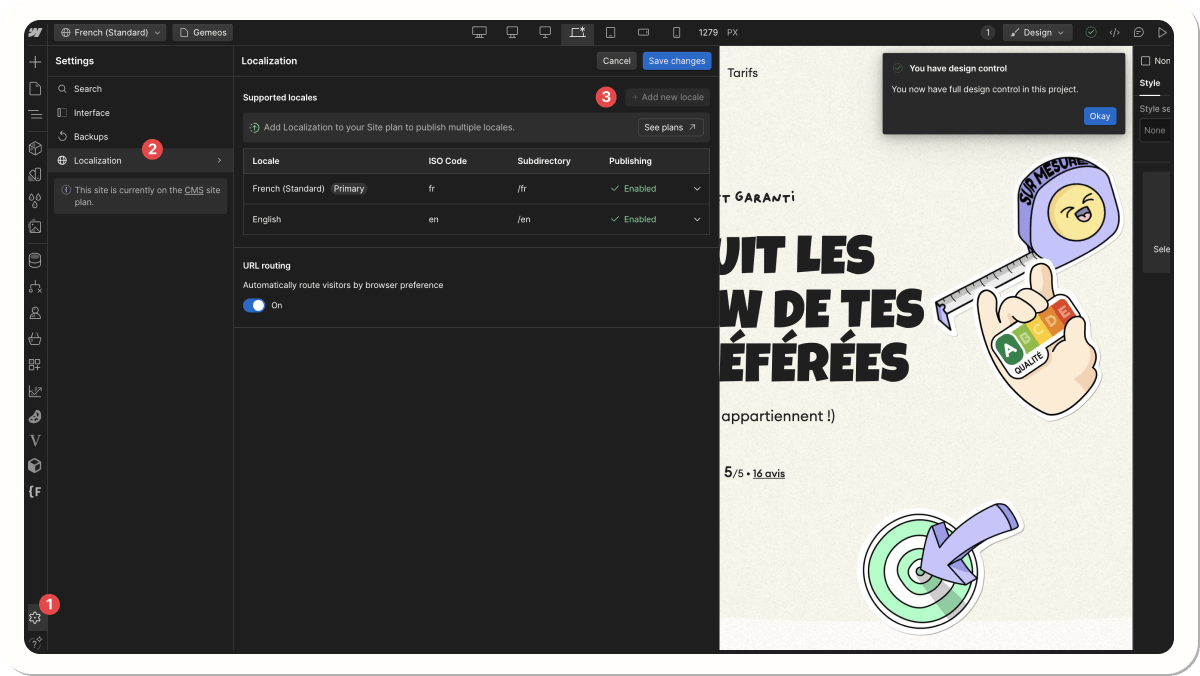
Step 1: Add locales
Start by adding locales (language-region combinations, like "fr-FR" for French in France or "de-DE" for German in Germany) for each version of your site.
Step 2: Customize content for each locale
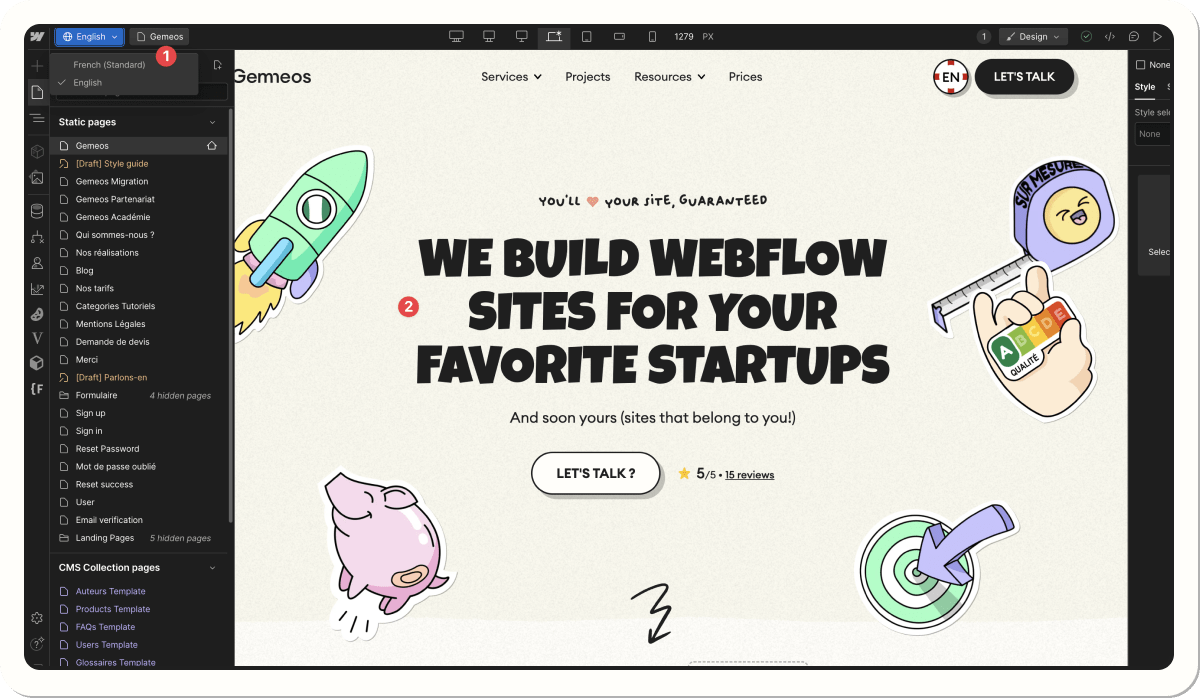
In the Designer, switch between locales to customize content, collections, styles, and images for each specific locale.
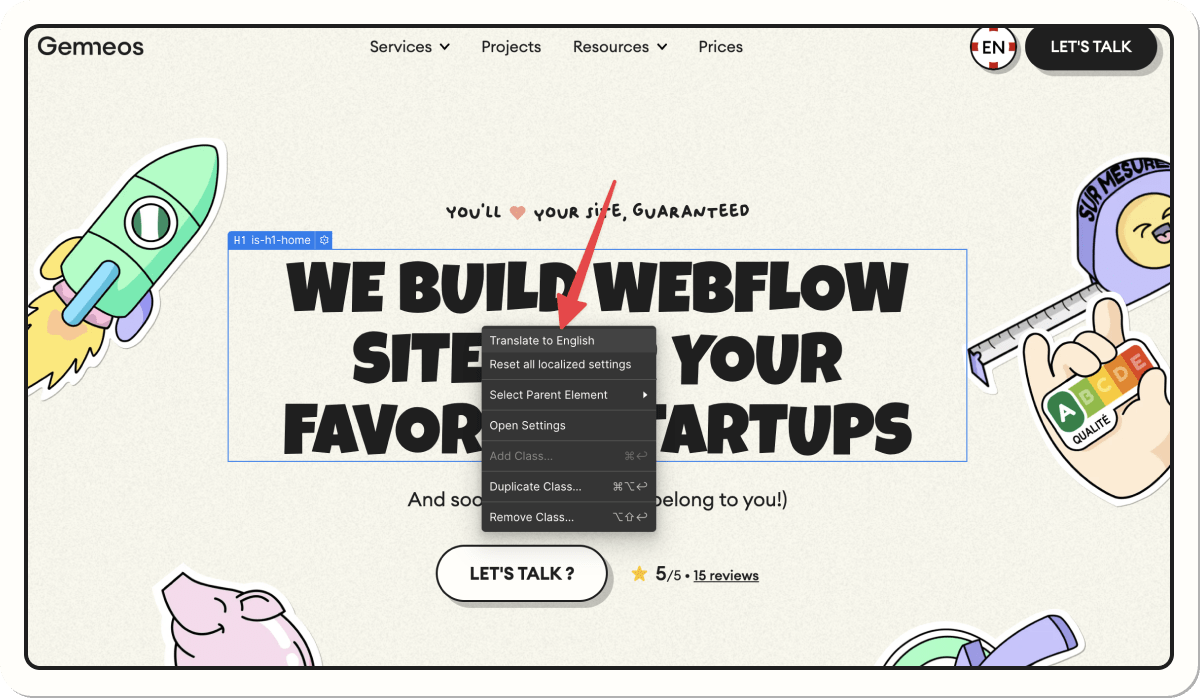
Step 3: Localize elements
Every piece of content and every Collection item can be localized. For example, a blog article about a national event like Bastille Day in France could be visible only on the French version of your site, while hidden from other locales.
Step 4: Optimize SEO and page settings
Webflow lets you customize SEO and Open Graph metadata for each locale, which helps improve SEO performance in local search results.
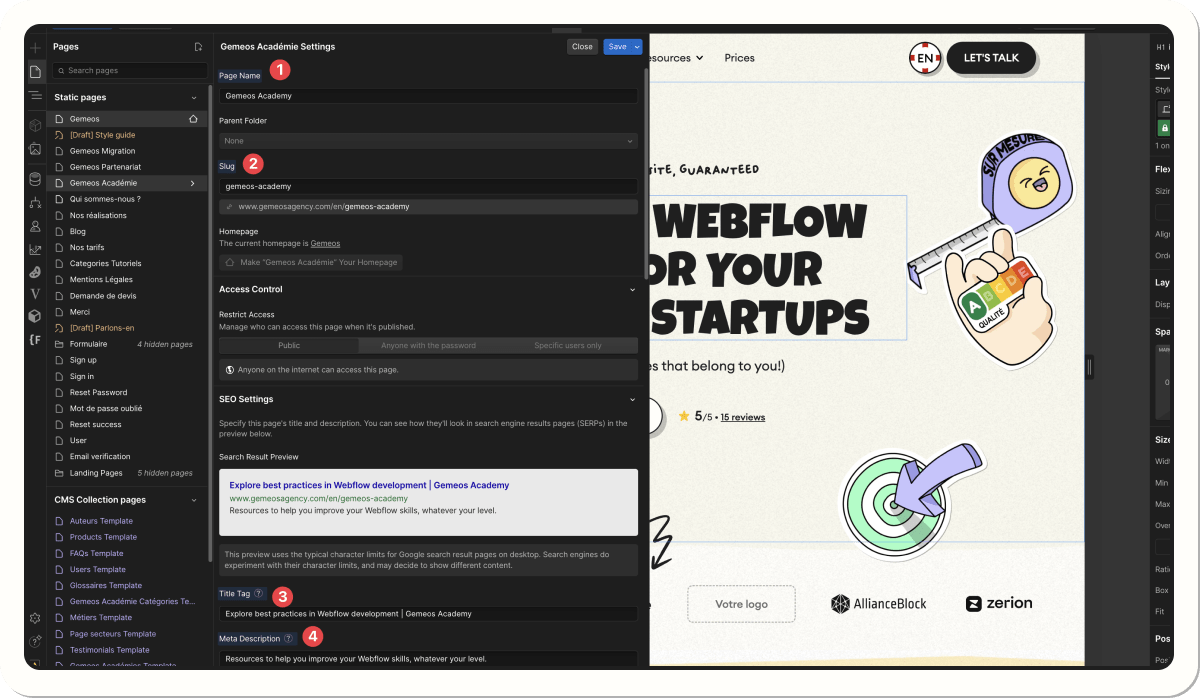
Step 5: UX adaptation
A language or region selector can be added, allowing users to choose the local version that works best for them
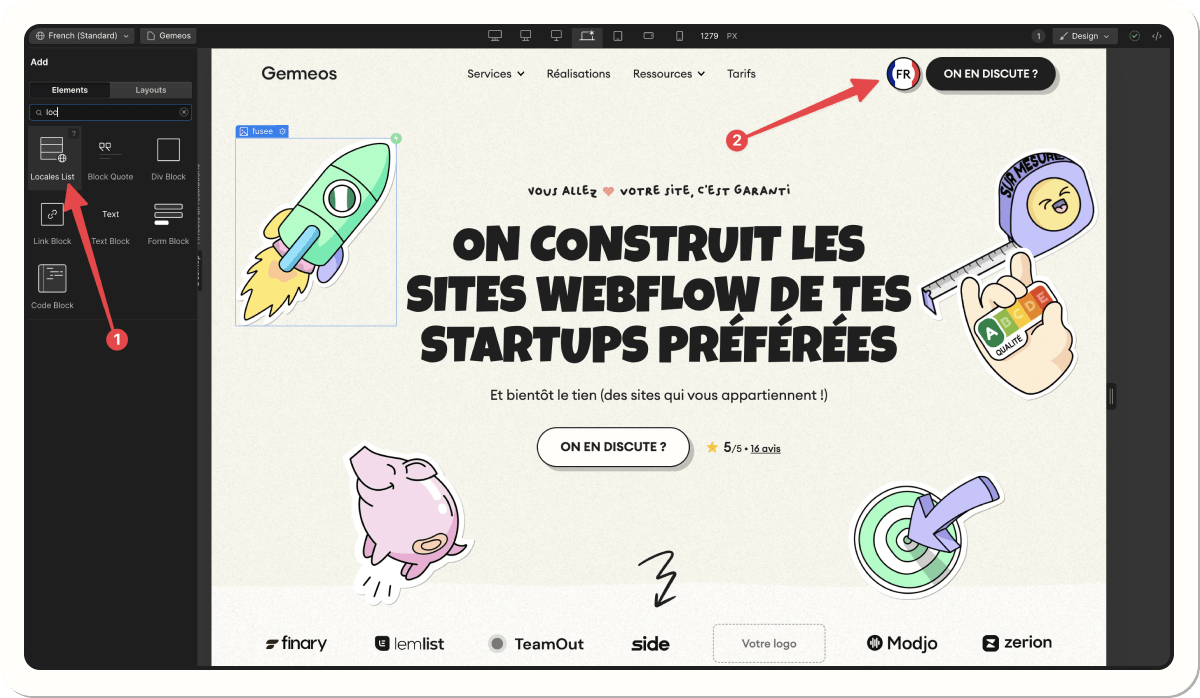
Note: slug and image customization based on language is available only on the Advanced plan at $29 per month)
Which languages can you use in Webflow Localization?
| Region | Languages |
|---|---|
| European languages | English, French, Spanish, German, Italian, Portuguese, Dutch, Polish, Swedish, etc. |
| Asian languages | Chinese (simplified and traditional), Japanese, Korean, Vietnamese, Thai, etc. |
| Middle Eastern languages | Arabic, Hebrew, Persian |
| Eastern European languages | Russian, Ukrainian, Czech, Romanian, etc. |
| Latin American languages | Spanish (Latin America), Portuguese (Brazil) |
Our work









What are the limitations of Webflow Localization?
Number of languages
Basic plans support up to 3 languages, while Advanced plans support up to 10. Enterprise plans allow a custom number.
Translation accuracy
Machine translations can lack accuracy and often require manual adjustments.
E-commerce compatibility
Localization isn’t available for e-commerce projects, although that should be possible in the coming months.
Additional cost
Each added language comes with a monthly fee, which can quickly drive up the total
The Essential plan is barely useful
The "Essential" plan is pretty frustrating because it doesn’t let you do some essential things for your international SEO, such as:
- Editing assets based on language (images, videos, etc.)
- Editing URLs and subdirectories
- Capped at a maximum of 3 languages
- No automatic visitor routing feature
Pricing plans for Webflow Localization
Webflow offers several localization plans, each with features tailored to the needs of growing businesses. You can choose between three tiers: Essential, Advanced, and Enterprise.
| Plan | Price per locale | Included features |
|---|---|---|
| Essential | 9 USD / month / locale | – Up to 3 locales – Automated translation – Localization of static pages and CMS – Localized SEO |
| Advanced | 29 USD / month / language | – Up to 10 locales – Asset localization – Localized URLs – Automatic visitor routing |
| Enterprise | Custom pricing | – Unlimited locales – Custom element visibility – Style localization – Full integration with Webflow Enterprise |
The impact of localization on SEO and user experience
Localization plays a key role in improving international SEO as well as user engagement. A multilingual site lets you deliver a personalized, relevant experience while improving rankings in local search results.
SEO benefits of Webflow localization:
1. Translated slugs
Slugs or URLs need to be localized so search engines can identify them correctly. For example, if you have an "About Us" page on your English version, its slug /about-us could be localized to /qui-sommes-nous on the French version.
| Language | Slug (URL) | Translated slug |
|---|---|---|
| English | /about-us | /qui-sommes-nous |
| French | /our-services | /nos-services |
2. hreflang tags
Using hreflang tags tells Google and other search engines which version of your site should appear for a user based on their language and location. It also helps prevent duplicate content issues.
Webflow automatically adds the different hreflang tags
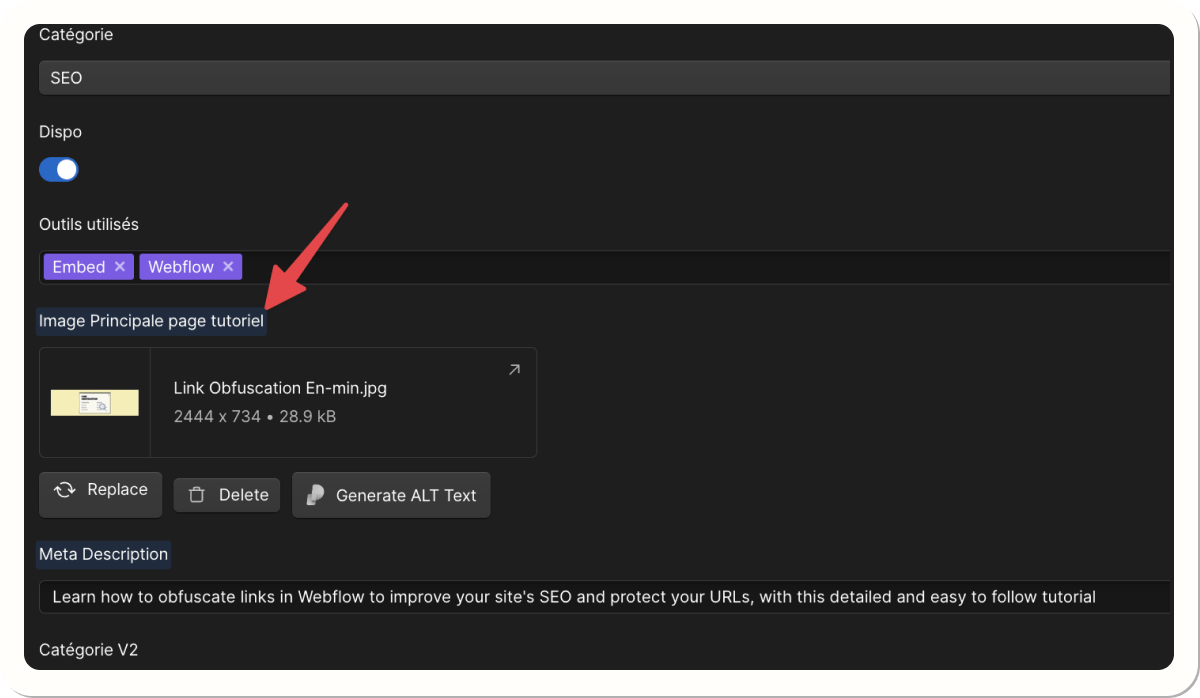
3. Image and alt text localization
To improve image indexing, every image and its alternative text (alt) should be translated. For example, a visual used on your German version should have alt text in German to improve visual search performance in that language.
Webflow Localization vs Weglot
When talking about website localization, it helps to compare Webflow Localization with popular tools like Weglot. Weglot is a widely used machine translation solution that integrates with many platforms, including Webflow. However, each tool has its strengths and limitations.
Comparison of key features:
| Feature | Webflow Localization | Weglot |
|---|---|---|
| Integration | Built directly into Webflow | Works as a third-party plugin |
| Translation method | Manual translation or via third-party integration | Machine translation with manual adjustments |
| SEO management | Manual SEO settings (slugs, hreflang, metadata) | SEO managed automatically |
| Design control | Full design control for each locale | Limited design customization |
| Ease of use | Easy for Webflow users, more complex for beginners | Quick setup, user-friendly interface |
| Pricing | Starting at $9/month per locale (basic plan) | Starting at €15/month (Starter plan) |
| Target audience | Webflow users looking for deep design control | Users who prioritize speed and simplicity |
Webflow Localization is an integrated solution for Webflow users who want full control over the design and SEO settings of each language version of their site. However, it requires more manual work. It’s the ideal option for companies that prioritize customization and already know the Webflow platform well.
On the other hand, Weglot offers an automated, fast, and simple approach to localization, perfect for those who want to launch a multilingual site quickly. Weglot handles translation and SEO automatically, but offers less control over design customization. Weglot is recommended for users who want a fast, no-fuss solution for managing multiple languages with minimal effort.
Learn with Webflow University
If you want to master every aspect of Webflow Localization and other advanced features, Webflow University is an excellent resource. This free learning platform offers interactive courses to help you become a Webflow expert.
Why use Webflow University?
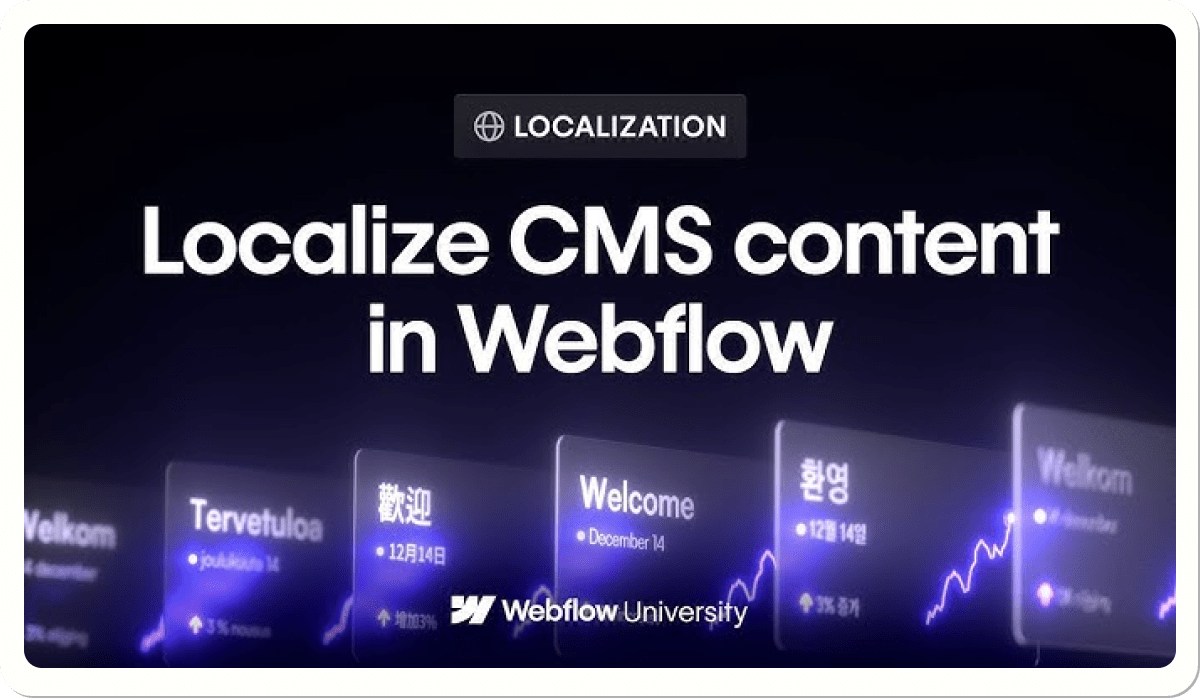
- Detailed tutorials: You’ll find video tutorials that guide you step by step through using Webflow, including setting up localization.
- SEO training: Courses are also available on SEO optimization within Webflow, helping you maximize your online presence.
- Free access: All courses are free and let you learn at your own pace.
By taking the time to learn through Webflow University, you’ll have everything you need to get the most out of Webflow’s features, including localization and SEO optimization.
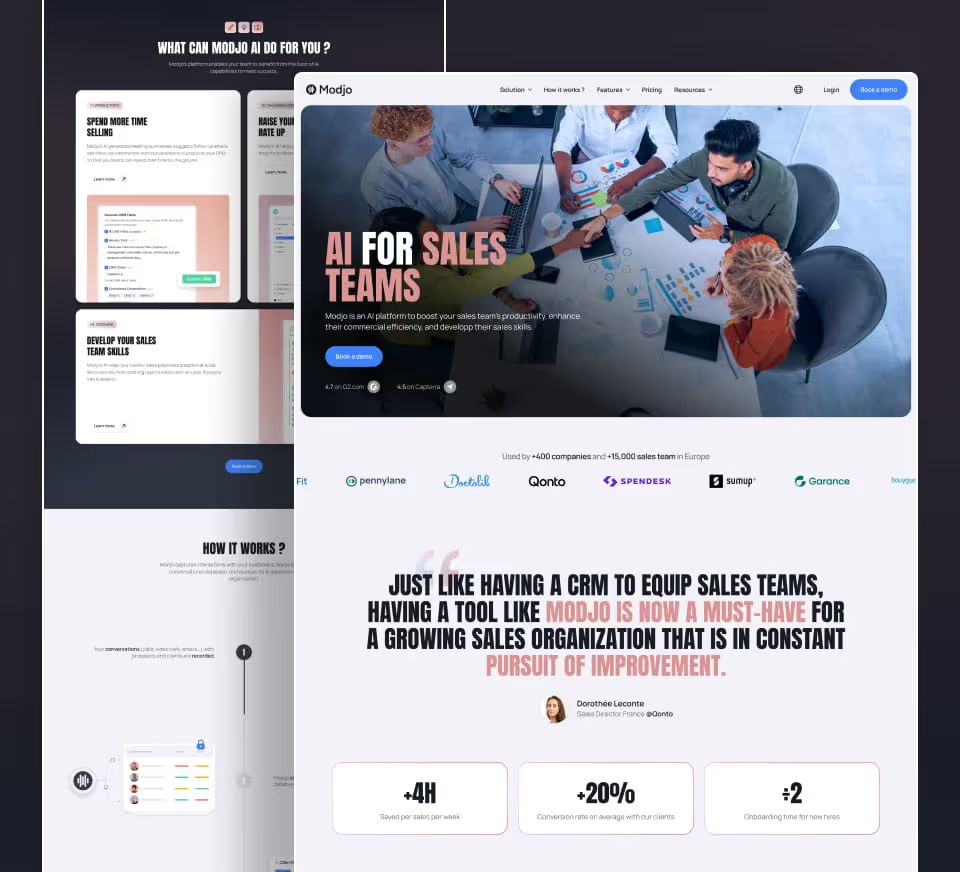
Example of Webflow Localization in action for our client Modjo.ai
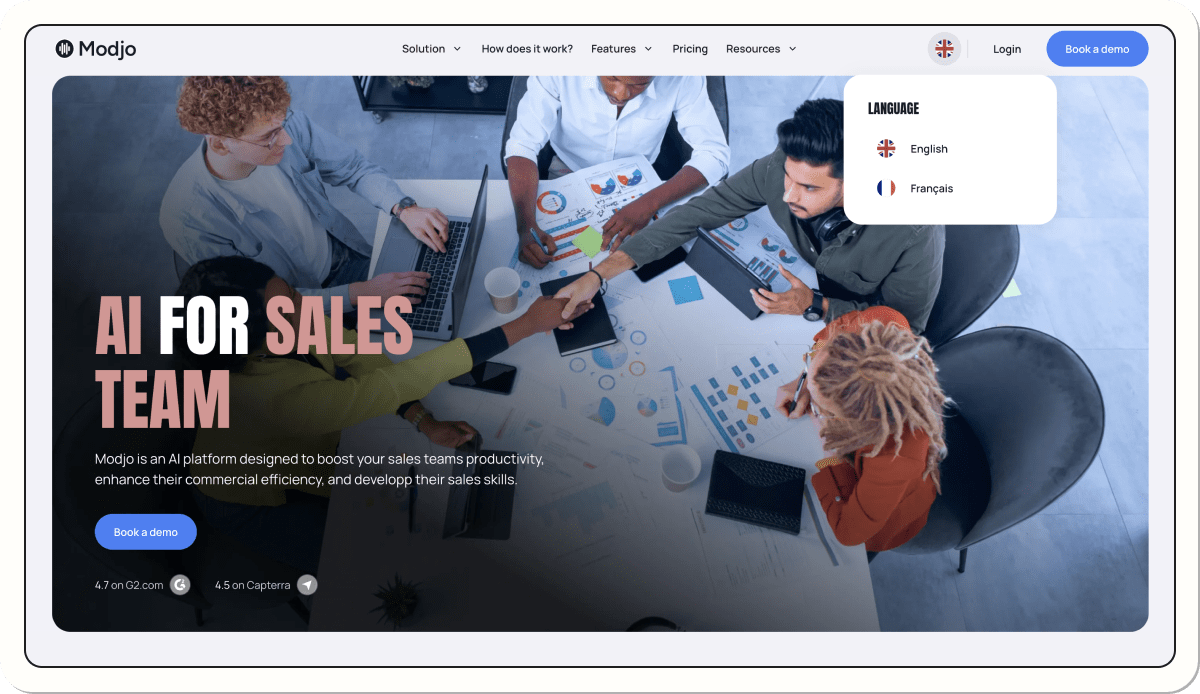
Modjo.ai had international challenges that required a multilingual presence. To meet those needs, we added English alongside French, localizing every asset, including URLs, to deliver a version optimized for international SEO. This approach lets them speak to a broader audience while strengthening their online visibility.
To see the full project, check out our Modjo.ai case study!
Conclusion
Localization is essential for companies looking to grow internationally. Webflow gives you powerful, intuitive tools to localize your site while maintaining a smooth user experience and strong SEO performance. Whether you’re just starting to localize your site or want to scale it further, Webflow’s flexibility lets you adapt every part of your site to your global audience.
If you need help implementing a high-performing localization strategy, contact our team and tap into our expertise




'%3e%3cg%20filter='url(%23hand-grabbing_svg-b)'%3e%3cpath%20fill='%231f1f1f'%20d='M19.42%204.98a2%202%200%200%200-.63.55.3.3%200%200%200-.02.36l1.68%202.91a.67.67%200%201%201-1.15.67l-2.16-3.74a2.33%202.33%200%200%200-3.1-.72%202%202%200%200%200-.62.54.3.3%200%200%200-.02.37l2.67%204.62a.67.67%200%201%201-1.16.66l-2.48-4.3a2.33%202.33%200%200%200-3.1-.72%202%202%200%200%200-.62.55.3.3%200%200%200-.02.37l3.01%205.22a.67.67%200%201%201-1.15.66l-1.5-2.58a2.33%202.33%200%200%200-3.94%202.46l4.66%208.08a.67.67%200%200%201-1.15.67l-3-5.2a.33.33%200%200%200-.46-.12l-.57.34a2.33%202.33%200%200%200-.86%203.18l2.67%204.62c1.4%202.44%207.78%205.13%2012.14%202.61l6.17-3.56a7%207%200%200%200%202.56-9.56l-4.66-8.08a2.33%202.33%200%200%200-3.2-.86'/%3e%3c/g%3e%3cg%20filter='url(%23hand-grabbing_svg-c)'%3e%3cpath%20fill='%23fff'%20d='M9.82%2021.06a1%201%200%200%201%20.02.39l-.05.12a1%201%200%200%201-.26.28l-.12.06a.7.7%200%200%201-.8-.3l-3-5.2a.33.33%200%200%200-.45-.12l-.58.34-1-1.74.3-.16-.52-.9-.02-.03a4.33%204.33%200%200%201%201.53-5.72%204%204%200%200%201%201.83-.63%202.3%202.3%200%200%201%20.4-1.9v-.02a4%204%200%200%201%201.24-1.08%204.3%204.3%200%200%201%203.65-.3q.46-.54%201.06-.88l.02-.01a4.3%204.3%200%200%201%204.8.36q.26-.2.55-.37a4.33%204.33%200%200%201%205.92%201.59L29%2012.92a9%209%200%200%201-3.29%2012.29l-6.17%203.56c-2.81%201.63-6.1%201.5-8.73.75a14%2014%200%200%201-3.62-1.62%208%208%200%200%201-2.53-2.47L2%2020.81a4.33%204.33%200%200%201%201.58-5.92l1%201.73a2%202%200%200%200-.68.6l-.13.2a2%202%200%200%200-.27.62l-.05.22a2%202%200%200%200-.01.69l.04.22q.07.34.25.64l2.67%204.62.14.23c1.63%202.33%207.58%204.74%2011.8%202.5l.2-.12%206.17-3.56a7%207%200%200%200%203.16-3.92l.1-.33a7%207%200%200%200-.7-5.31L22.6%205.84a2.3%202.3%200%200%200-1.2-1.02l-.21-.07a2.3%202.3%200%200%200-1.77.23%202%202%200%200%200-.63.55.3.3%200%200%200-.02.36l1.68%202.91.06.12a1%201%200%200%201%200%20.39l-.04.12a1%201%200%200%201-.26.28l-.12.06-.26.03-.13-.02a1%201%200%200%201-.33-.2l-.07-.11-2.16-3.74a2.3%202.3%200%200%200-1.2-.91l-.2-.06a2.3%202.3%200%200%200-1.5.14l-.2.1q-.37.21-.62.55a.3.3%200%200%200-.02.37l2.66%204.61.06.12a1%201%200%200%201%20.01.39l-.05.12a1%201%200%200%201-.26.29l-.12.05-.26.03-.13-.02a1%201%200%200%201-.32-.2l-.08-.1-2.48-4.3a2.3%202.3%200%200%200-1.2-.91l-.2-.06a2.3%202.3%200%200%200-1.5.14l-.2.1a2%202%200%200%200-.62.55.3.3%200%200%200-.02.36l2.68%204.65-.24.9-.58.34-1.5-2.59a2.34%202.34%200%200%200-2.93-.72l-.2.11a2.34%202.34%200%200%200-.81%203.08l4.66%208.08zm1.88-8.75a.67.67%200%200%201-.62%201l-.13-.02a1%201%200%200%201-.32-.2l-.08-.11.58-.33.24-.91z'/%3e%3c/g%3e%3c/g%3e%3cdefs%3e%3cfilter%20id='hand-grabbing_svg-b'%20width='34.79'%20height='33.38'%20x='-1.58'%20y='1.67'%20color-interpolation-filters='sRGB'%20filterUnits='userSpaceOnUse'%3e%3cfeFlood%20flood-opacity='0'%20result='BackgroundImageFix'/%3e%3cfeColorMatrix%20in='SourceAlpha'%20result='hardAlpha'%20values='0%200%200%200%200%200%200%200%200%200%200%200%200%200%200%200%200%200%20127%200'/%3e%3cfeOffset%20dy='2'/%3e%3cfeGaussianBlur%20stdDeviation='2.5'/%3e%3cfeComposite%20in2='hardAlpha'%20operator='out'/%3e%3cfeColorMatrix%20values='0%200%200%200%200%200%200%200%200%200%200%200%200%200%200%200%200%200%200.35%200'/%3e%3cfeBlend%20in2='BackgroundImageFix'%20result='effect1_dropShadow_2119_7444'/%3e%3cfeBlend%20in='SourceGraphic'%20in2='effect1_dropShadow_2119_7444'%20result='shape'/%3e%3c/filter%3e%3cfilter%20id='hand-grabbing_svg-c'%20width='38.78'%20height='37.38'%20x='-3.58'%20y='-.33'%20color-interpolation-filters='sRGB'%20filterUnits='userSpaceOnUse'%3e%3cfeFlood%20flood-opacity='0'%20result='BackgroundImageFix'/%3e%3cfeColorMatrix%20in='SourceAlpha'%20result='hardAlpha'%20values='0%200%200%200%200%200%200%200%200%200%200%200%200%200%200%200%200%200%20127%200'/%3e%3cfeOffset%20dy='2'/%3e%3cfeGaussianBlur%20stdDeviation='2.5'/%3e%3cfeComposite%20in2='hardAlpha'%20operator='out'/%3e%3cfeColorMatrix%20values='0%200%200%200%200%200%200%200%200%200%200%200%200%200%200%200%200%200%200.35%200'/%3e%3cfeBlend%20in2='BackgroundImageFix'%20result='effect1_dropShadow_2119_7444'/%3e%3cfeBlend%20in='SourceGraphic'%20in2='effect1_dropShadow_2119_7444'%20result='shape'/%3e%3c/filter%3e%3cclipPath%20id='hand-grabbing_svg-a'%3e%3cpath%20fill='%23fff'%20d='M0%200h32v32H0z'/%3e%3c/clipPath%3e%3c/defs%3e%3c/svg%3e)


