Headless CMS migration: the complete Sanity + Astro guide (2026)
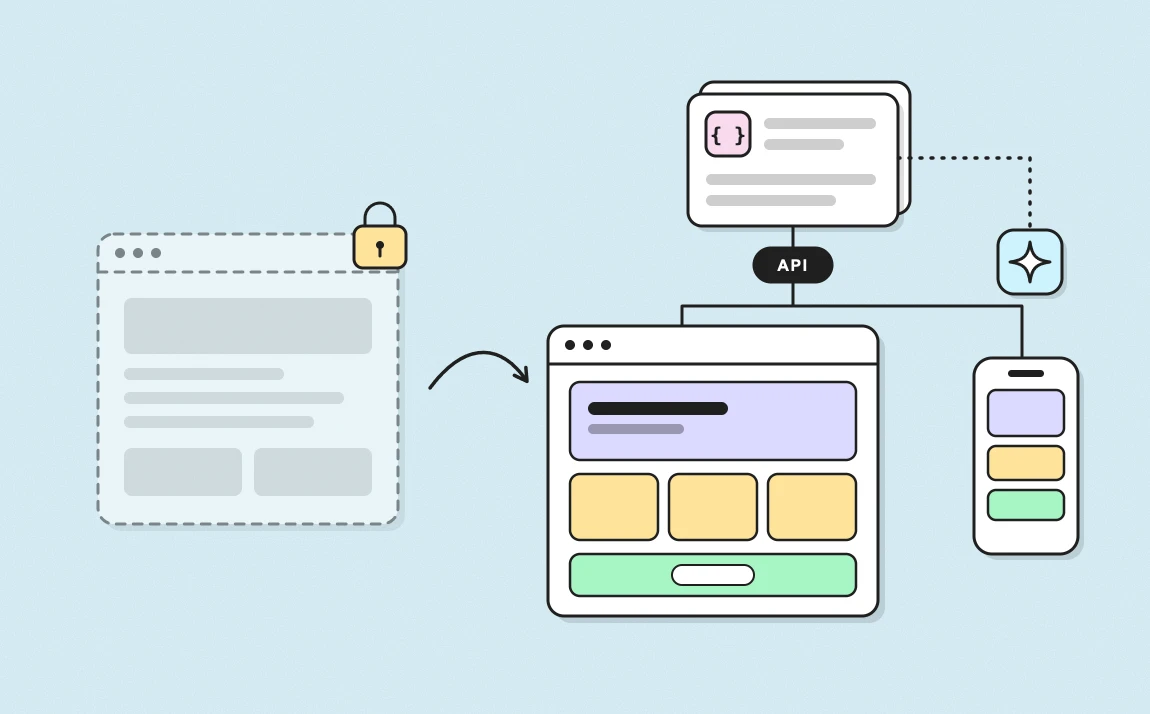
A headless CMS migration means separating your website's content (managed in a CMS like Sanity) from its presentation (coded with a framework like Astro), with the two talking through an API. You gain full control over technical SEO, a back office built around your team, and an architecture that AI can operate.
What you don't gain automatically: speed. That's the first myth this guide will debunk, with data to back it up.
At the Gemeos web agency, we've been building websites for startups and scale-ups for years, on Webflow, WordPress and now headless. This guide brings together everything we know on the subject: when to migrate, when not to, what it costs, and how to do it without losing a single Google ranking.
article summary
- A headless CMS migration separates content (Sanity) from presentation (Astro), connected through an API.
- The real gain is not default speed but control: technical SEO, content model, workflows and AI-driven operations.
- According to HTTP Archive, Astro and Webflow pass Core Web Vitals on about 67% of mobile sites, WordPress on 49%.
- With AI, building a headless site now costs about the same as a Webflow site, and subscriptions are often lower as the team grows.
- The audit, content modeling and redirect plan drive most of a migration's SEO outcome.
- The design system is the real key to agility: it is what lets marketing create pages on its own without breaking the brand.
Want to take it further? Ask:
Headless CMS: the definition in 30 seconds
A headless CMS is a content management system without a "head," meaning without a built-in presentation layer. It stores and structures content, then delivers it via API to any front end: a website, a mobile app, an AI agent, an in-store screen.
By contrast, a monolithic CMS (classic WordPress, Webflow, Drupal, Wix) handles content, design, code, and hosting in a single tool.
Monolithic, headless, hybrid: the three architectures
| Architecture | Principle | Examples |
|---|---|---|
| Monolithic | Content, design, and hosting in a single tool | Webflow, classic WordPress, Wix, Squarespace |
| Headless | The CMS manages content, a separate framework handles the display | Sanity + Astro, Contentful + Next.js, Storyblok + Nuxt |
| Hybrid | A monolith that also exposes its content via API, or a headless CMS with a visual editor | WordPress + WPGraphQL, Webflow Cloud, Sanity with Presentation |
Why it's called "decoupled"
On a headless site, your marketing team publishes an article in Sanity. Sanity sends a signal (webhook), and the Astro site fetches the content and regenerates the relevant page. The visitor receives a static HTML page, served from the CDN node closest to them.
Each component can evolve independently. Want to redo the design? The content stays put. Want to switch hosts? The CMS doesn't even know.
Why 2026 is the right time to migrate
Headless has been around for ten years. What has changed is that four recent developments make it accessible and cost-effective for a scale-up, not just for large enterprises.
1. Astro has a secure future
In January 2026, Cloudflare acquired The Astro Technology Company. The framework remains open source under the MIT license, with public governance. Astro 6 shipped in March 2026 with Live Content Collections (content fetched on request, no rebuild) and built-in CSP.
For a company choosing its stack for the next five years, that's a strong signal. Astro is no longer a passion project. It's infrastructure backed by a company that serves a major share of the web.
2. Webflow has overhauled its pricing model
In May 2026, Webflow merged its CMS and Business plans into a single Premium plan ($25/month billed annually, 20,000 CMS items, 40 collections) and launched a Team plan for growing teams, annual only and quote-based.
Good news for small sites: item limits are higher. But for a team of 8 to 15 people publishing in several languages, the bill now comes down to seats, localization, and the Team plan. That's exactly when the headless question comes up.
3. AI agents can now operate a CMS
Since December 2025, the Sanity MCP server has been generally available. In practice, Claude Code, Cursor, or VS Code can read your content schema, create documents, prepare releases, and even guide a migration from WordPress, Contentful, Strapi, or Drupal.
A CMS configured in code becomes a CMS that AI can evolve. A CMS configured by point-and-click, much less so.
4. GEO (Generative Engine Optimization) rewards structured content
ChatGPT, Perplexity, and Gemini cite the sources they understand best: clear definitions, structured data, FAQs, identifiable entities. A headless CMS forces you to structure your content in fields rather than free-form text blocks. That's a direct advantage for getting cited.
The comparison: Webflow vs WordPress vs Drupal vs Sanity + Astro
No platform wins on every criterion. Sanity + Astro wins on control, flexibility, and scalability. Webflow wins on time-to-market and visual autonomy. WordPress wins on ecosystem. Drupal wins on complex institutional needs.
| Criterion | Webflow | WordPress | Drupal | Sanity + Astro |
|---|---|---|---|---|
| Native performance | Good | Variable (plugins, theme) | Decent | Excellent if well coded |
| Technical SEO | Good, limited on the fine details | Very complete via plugins | Very complete | Full control |
| Content modeling | Collections, simple references | Custom post types | Very rich | Unlimited, fine-grained relationships |
| Roles and permissions | Basic to intermediate | Complete | Very complete | Complete (advanced on Enterprise) |
| Editorial workflows | Drafts, page-by-page publishing | Plugins | Native | Releases, scheduling, comments, tasks |
| Multilingual | Webflow Localize (paid) | Plugins (WPML, Polylang) | Native | Native, per field or per document |
| Design system | Webflow classes and components | Depends on the theme | Depends on the theme | Code components, tokens, constrained blocks |
| AI and agents (MCP) | Webflow MCP, Designer | Good: WordPress Studio, MCP | Limited | Full MCP, schema in code |
| Upfront cost | Low | Low | High | Comparable to Webflow, thanks to AI |
| 3-year cost (team of 10) | Medium, grows with seats | Medium, grows with maintenance | High | Medium, stable |
| Developer dependency | Low | Medium | High | Medium during the build, low afterward |
| Lock-in | High (limited export) | Low | Low | Very low (content in JSON, open source front end) |
How to read between the lines
Webflow remains an excellent choice up to a certain stage. For a marketing site of 20 to 200 pages, a small team, and a need to launch fast, it's hard to beat. We use it on a large share of our projects. We covered it in detail in our comparison Webflow or WordPress: which CMS to choose.
WordPress has an unmatched ecosystem, but every plugin adds debt. Beyond a certain volume, maintenance, security, and performance become a line item of their own.
Drupal is built for institutions: very fine-grained permissions, complex content, compliance. It's often oversized for a scale-up. See our Webflow vs Drupal comparison.
Sanity + Astro makes sense when content becomes a strategic asset: multiple languages, multiple teams, programmatic SEO, products or data to sync, or a desire to run the site with AI.
What headless really changes for SEO
Headless doesn't magically make a site faster. It gives you full control over what Google and LLMs receive. The distinction matters, and the data shows it.
The "headless = faster" myth
The HTTP Archive Core Web Vitals report measures the share of sites that pass Google's three metrics (LCP, INP, CLS) for real Chrome users. The 2025 and 2026 numbers are telling:
| Platform | Sites passing Core Web Vitals | Source |
|---|---|---|
| Wix | 80% | HTTP Archive, April 2026 |
| Webflow | 67% (mobile), 79% (desktop) | HTTP Archive, November 2025 |
| Astro | 67% | HTTP Archive, April 2026 |
| Drupal | 64% | HTTP Archive, April 2026 |
| WordPress | 49% | HTTP Archive, April 2026 |
Two takeaways:
- Astro does much better than WordPress, but not better than Webflow on average. A poorly built Astro site (unoptimized images, third-party scripts everywhere) can be slow.
- Closed platforms score well because they limit what you can do. Less freedom, less risk. Headless flips that logic: total freedom, so performance depends on the quality of the build.
The real promise of headless is a higher ceiling, not a higher floor. With Astro, a well-built site ships zero JavaScript by default and reaches Lighthouse scores close to 100. But that's an engineering choice, not a given.
The real gain: control over technical SEO
Here's what a Sanity + Astro site lets you do natively, without workarounds:
| SEO lever | On a monolithic CMS | With headless Sanity + Astro |
|---|---|---|
| Structured data (JSON-LD) | Manual embed, page by page | Generated automatically from the content model |
| Canonicals | Global or per-page setting | Rules per content type, with exceptions |
| Hreflang | Handled by the localization tool | Generated from translation relationships |
| Sitemaps | One global sitemap | Segmented sitemaps (blog, products, languages), with real lastmod |
| Redirects | List in settings, often capped | Dedicated Sanity document, editable by marketing, deployed at the CDN level |
| Rendering | Dictated by the platform | Static, server or hybrid, page by page |
| Internal linking | Manual | Suggestions and "related articles" blocks based on references |
| Meta tags | Standard fields | Custom fields, validations (length, keyword present) |
| Robots and indexing | Global settings | Rules per type, per language, per environment |
Programmatic SEO becomes accessible
This is probably the most underrated lever. Programmatic SEO means generating pages at scale from structured data: one page per integration, per city, per use case, per comparison.
On Webflow, it's possible up to the CMS limits (20,000 items on the Premium plan). With headless, the content model and Astro templates let you generate thousands of pages, each with its own structured data, internal linking and indexing rules.
A typical SaaS example: one page per integration ("Connect [your tool] to HubSpot"), powered by a Sanity document that holds the features, use cases, screenshots and FAQ specific to that integration.
The three SEO risks of a headless migration
- Client-side rendering. If the front end loads content in JavaScript after display, Google may index it poorly or late. With Astro, rendering is static or server-side by default: the risk disappears, as long as you don't reintroduce it.
- Lost redirects. This is the top cause of traffic drops after a migration. Every old URL must 301 redirect to its new equivalent. We cover this in the checklist.
- Leaking previews. Misconfigured preview environments end up indexed. You need strict noindex rules and authentication on everything that isn't production.
To go further on the fundamentals, our guide 9 steps to optimize your Webflow site for SEO still applies whatever your stack.
GEO: getting cited by ChatGPT, Perplexity and Gemini
GEO (Generative Engine Optimization) means optimizing your content so AI answer engines pick it up and cite it. A headless CMS helps on three fronts: structure, consistency and distribution.
Structure: a content model instead of one big block of text
An LLM extracts information better when it has a name. In Sanity, a definition can be a definition field, an FAQ a list of question / answer pairs, a key figure a stat object with its value, source and date.
The result: these elements can be rendered cleanly in semantic HTML, marked up in JSON-LD, and reused across the site with the same wording.
Consistency: a single source of truth
Your pricing, your customer count, your product definition: if this information lives in one place in the CMS and is referenced everywhere, it stays consistent. LLMs penalize contradictory sources.
Distribution: serving machines as well as humans
With Astro, it's easy to generate more than HTML pages:
- an
llms.txtfile that summarizes the site and points to key pages - markdown versions of each page (for example
/blog/my-article.md), lighter for an agent to read - JSON feeds for partners or integrations
- complete JSON-LD markup (Organization, Article, FAQPage, Product, BreadcrumbList)
| GEO lever | Headless implementation |
|---|---|
| Explicit definitions | Dedicated field, rendered at the top of the section |
| FAQ | Structured object, marked up as FAQPage |
| Figures and sources | Reusable stat object with source and date |
| Entities | Referenced person, company, product documents |
| Machine access | llms.txt, markdown endpoints, up-to-date sitemaps |
| Freshness | Real update date, managed by the CMS |
Editor experience: a truly agile custom CMS
This is the argument that wins over our clients most, well before performance. With Sanity, the back office isn't a generic tool your team adapts to: it's a tool built around your team.
A custom Studio
Sanity Studio, the editing interface, is an application configured in code. That lets you:
- Name things the way your team names them. "Integration page", "Customer testimonial", "Offer", rather than "Collection 7".
- Guide input. Contextual help under each field, examples, character limits, required fields.
- Prevent mistakes. Validation rules: a meta description over 155 characters, an article without a share image or a page without a keyword can't be published.
- Organize by role. A "Blog" view for the content manager, a "Product" view for the PMM, a "Legal" view for the legal team.
Visual preview
The long-standing complaint about headless: "you edit forms without seeing the result." That's solved. Sanity's Presentation tool shows the live site next to the fields. Click a heading in the preview and the matching field opens. Edit it, and the preview updates.
Editorial workflows worth the name
| Need | Sanity |
|---|---|
| Prepare a launch (10 pages + 3 articles + a new offer) | Content Releases: group changes, preview everything together, publish all at once or on a date |
| Schedule a publication | Scheduled publishing |
| Get a review | Comments on a specific field, assigned tasks |
| Roll back | Full history of every document, one-click restore |
| Work as a team | Real-time collaborative editing, no conflicts |
What marketing does on its own, what stays with dev
| Marketing does on its own | Dev steps in |
|---|---|
| Create and publish pages from existing blocks | Create a new block type |
| Write, translate, schedule | Change the content model |
| Manage redirects and meta | Add an integration (CRM, analytics, A/B testing) |
| Launch a campaign through a Release | Evolve the design system |
| Reorganize navigation | Optimize performance |
The line isn't fixed. With vibe coding (more on that below), part of the right column moves to the left.
Design system: the real key to agility
People often talk about the CMS when they talk about agility. That's a mistake: a well-configured Studio lets you publish content, but the design system is what lets you create pages. Without it, every new landing page becomes a design and development project again. With it, it's an assembly of blocks that marketing does on its own, on brand.
In other words, the agility of a headless site is decided at design time, not at code time. That's why we treat the design system as a deliverable of the migration in its own right, not as a step in the build.
What a design system changes for your team
| Without a design system | With a design system |
|---|---|
| Every new page goes through a designer, then a developer | Marketing assembles the page alone from existing blocks |
| Pages drift: three button styles, five shades of gray | Every page follows the brand guidelines, by construction |
| Translated pages break (longer text, rigid layouts) | Blocks are designed to adapt to every language |
| A new editor takes weeks to master the site | They learn a library of named blocks in one session |
| An AI agent produces off-brand pages | It reuses existing components and produces consistent pages |
| Every brand update means reworking pages one by one | Change one token and the whole site follows |
What a good design system contains
- Foundations: design tokens (colors, typography, spacing, radii, shadows), defined once and named by intent ("brand background", "secondary text").
- Components: buttons, cards, tags, forms, with their states and variants.
- Page blocks: hero, logos, features, testimonials, pricing, FAQ, CTA. These are what marketing works with in Sanity.
- Usage rules: which block for which goal, how many characters per heading, which combinations to avoid.
- A single source: the same names in Figma, in the Astro code and in Sanity Studio. The designer, the developer, marketing and the AI agent all talk about the same thing.
Example: the interactive blocks in this guide
The eight interactive blocks in this guide (the architecture diagram, the filterable comparison, the Core Web Vitals chart, the page builder demo, the stack, the subscription simulator, the diagnostic and the migration timeline) were built from scratch with Claude Cowork, using the design system of our product, the Gemeos app.
In practice, the agent read our Figma mockups (containers, cards, toggles, tabs, tags, KPI cards), extracted the tokens (colors, shadows, radii, typography), then coded each block using only those foundations. We reviewed and adjusted the content without redesigning a single block: the design system guaranteed consistency.
That's exactly what happens on a well-designed headless site. When the foundations are clear, an AI agent produces new components that look like they've always been part of the site. Without a design system, it would have invented a style for each block.
The block-based page builder
A well-designed headless site gives marketing the freedom to create pages without giving it the ability to break the brand. The constrained block-based page builder is the visible part of the design system.
The principle: one Sanity block = one Astro component. Each section of the site (hero, logo grid, testimonials, pricing table, FAQ, CTA) exists twice:
- in Astro, as a coded component that follows the design system
- in Sanity, as a block with its fields (heading, text, image, variant)
Marketing assembles a page by stacking blocks in Sanity. Astro renders each block with the matching component. A new landing page comes together in 20 minutes, with no dev ticket.
Tokens so you never go off brand
Design tokens are the base values of your identity: colors, typography, spacing, radii, shadows. On a headless site, they're defined once in the code and used everywhere.
On the Sanity side, you never offer a free color picker. You offer named variants: "Light background", "Brand background", "Dark background". Marketing picks an intent, and the design system applies the right value.
Guardrails that prevent drift
| Risk | Guardrail |
|---|---|
| Headings too long that break the layout | Character limit with a counter |
| Images in the wrong format | Enforced ratio, cropping with a focal point |
| Pages without a CTA | Required CTA block on certain page types |
| Off-brand colors | Named variants only |
| Inconsistent stacking | Rules: no two heroes, FAQ always at the bottom |
That's the difference from a free-form visual tool: you don't ask marketing to have a designer's eye. You give them a system that always produces a good result. And the richer the design system is in blocks and variants, the longer the "marketing does on its own" column gets. It's a topic close to our hearts, and we explain it in why your brand image matters more than you think.
Vibe coding and AI agents on a headless CMS
Vibe coding means building or changing software by describing what you want in natural language to an AI agent, which writes the code. On a headless site, this is a major shift: the site becomes a project your team can evolve with AI, without waiting for the next sprint.
Why headless is a better fit than a visual tool
In Sanity + Astro, everything is code or structured data: the content schema, the components, the design system, the configuration. An AI agent can read all of it, understand all of it and propose changes you can verify.
In a visual tool, the state of the site is locked inside an interface. AI can help, but it works through a narrower API.
What the Sanity MCP server makes possible
MCP (Model Context Protocol) is a standard that lets an AI agent use external tools. The Sanity MCP server, compatible with Claude Code, Cursor, VS Code, Claude Desktop, v0 and Lovable, exposes more than 40 tools:
| Category | What the agent can do |
|---|---|
| Documents | Create, search, edit, publish, unpublish |
| Schema | Read the content model, deploy changes |
| Releases | Prepare and schedule a batch of content |
| Media | Generate and transform images |
| Search | Semantic search across content and documentation |
| Migration | Guided paths from WordPress, Contentful, Strapi, Drupal |
A typical workflow: from request to deployment
- The growth lead opens Claude Code: "Add a 'Comparison' block with a 3-column table and a highlighted row."
- The agent creates the block schema in Sanity and the Astro component, reusing the existing tokens.
- It opens a pull request with a site preview.
- A developer reviews it in 10 minutes, approves and merges.
- The block is available in the Studio for the whole team.
Content agents
Beyond code, AI works directly on content:
- translate a page into 4 languages while following a glossary
- fill in missing meta descriptions according to your rules
- suggest relevant internal links based on existing references
- detect outdated content (dated figures, discontinued products)
Limits to keep in mind
Vibe coding doesn't remove the need for expertise. It shifts it.
- Human review is still essential, for code and content alike.
- Permissions matter. An agent should work with a limited token, on a test dataset before production.
- Quality depends on the foundation. An agent working on a clean design system produces clean work. On a messy foundation, it amplifies the mess. The interactive blocks in this guide, generated from our app's design system, are a good example.
That's why the initial architecture matters so much: it determines what AI can do well for years to come.
Why Astro (and when to choose Next.js)
Astro is a web framework built for content-driven sites: marketing sites, blogs, documentation, editorial e-commerce. Its core principle is islands architecture: the page is static HTML, and only interactive elements (a form, a calculator) load JavaScript.
Astro vs Next.js for a marketing site
| Criterion | Astro | Next.js |
|---|---|---|
| Philosophy | Content first, zero JS by default | App first, React everywhere |
| JavaScript shipped | Only for interactive islands | React runtime on every page |
| Default performance | Excellent | Good, requires optimization |
| Components | Astro, React, Vue, Svelte can be mixed | React only |
| Hosting | Anywhere (Cloudflare, Vercel, Netlify, server) | Best on Vercel |
| Best for | Marketing site, blog, docs, programmatic SEO | Marketing site + connected app, customer portal |
| Learning curve | Gentle (close to HTML) | Steeper |
When to choose Next.js
If your marketing site and your product share many components, or if the site includes a real application layer (customer portal, complex configurator), Next.js is a sound choice.
That's the case for Allo, the AI phone assistant: their site runs on Next.js with Sanity as the CMS. Same headless logic, different framework.
For a site whose main job is to rank, persuade and convert, Astro is our default choice.
Our reference stack
Here is the architecture we recommend for a B2B scale-up migrating to headless.
| Building block | Recommended tool | Role | Alternatives |
|---|---|---|---|
| CMS | Sanity | Structured content, Studio, workflows | Storyblok, Contentful, Payload |
| Framework | Astro | Page generation, components | Next.js, Nuxt |
| Hosting | Cloudflare or Vercel | CDN, server rendering, previews | Netlify |
| Images | Sanity Image Pipeline | Resizing, modern formats, focal point | Cloudinary |
| Forms | Direct CRM integration (HubSpot, Attio) | Lead capture | Formspree, Tally |
| Analytics | GA4 + product analytics tool | Measurement | Plausible, PostHog |
| A/B testing | Tool connected to Sanity blocks | Tests without developers | Native variants |
| Search | Algolia or Sanity search | Site search | Pagefind (static) |
| SEO monitoring | Search Console + crawler | Post-migration tracking | Screaming Frog, Ahrefs |
{cta}
Costs and TCO: what a headless migration really costs
For a long time, headless cost more: it took weeks of development to model the content, code the components and configure the back office. In 2026, that's no longer true. With AI agents, the Sanity MCP server and Astro components generated from the design system, the cost of building a headless site is now comparable to that of a Webflow site. And on subscriptions, headless is often cheaper as soon as the team grows.
The four cost categories
| Category | Webflow | Sanity + Astro |
|---|---|---|
| Site build | Baseline | Comparable: schema, components and Studio accelerated by AI |
| Subscriptions | Site plan + Workspace + seats + Localize | Sanity seats + hosting |
| Ongoing changes | Often done in-house | In-house or with an AI agent, reviewed by a developer |
| Hidden costs | Plan caps, bandwidth add-ons, seats | Dependency maintenance, monitoring |
Worked example: a 10-person team
Assumptions: 2 people who need a full seat (design, admin), 8 content editors, a single site. Public annual pricing as of September 2026, excluding tax.
| Line item | Webflow | Sanity + Astro |
|---|---|---|
| Site plan | Premium: $25/month | Not applicable |
| Workspace | Growth: $49/month | Not applicable |
| Full seats | 2 × $39 = $78/month | Included in Sanity seats |
| Editor seats | 8 × $15 = $120/month | 10 × $15 = $150/month (Growth plan) |
| Hosting | Included | About $20/month (Vercel Pro, 1 member) or less on Cloudflare |
| Multilingual | Webflow Localize extra | Included |
| Total subscriptions | About $272/month, or $3,260/year, excluding Localize | About $170/month, or $2,040/year |
In this example, headless comes out about $100/month cheaper, or more than $1,200/year. The gap widens with every language you add and every person who joins the team. The simulator below runs the numbers for your situation.
For details on the Webflow side, see our guides on Webflow plans and pricing and the cost of a Webflow website redesign.
Should you go headless? The diagnosis
Headless is not a mandatory upgrade. It's an answer to specific problems. If you don't have them, stay on your current stack and invest elsewhere.
The 10 diagnostic questions:
- Does your site have more than 300 pages or 5,000 CMS items?
- Do you publish in more than two languages?
- Do more than 5 people publish on the site regularly?
- Do you need approval workflows (review, legal, coordinated launches)?
- Does your content need to feed other channels (app, product, partners, AI agents)?
- Do you want to do programmatic SEO at scale?
- Are you hitting technical limits on your current platform?
- Do you have an in-house developer or a long-term agency partner?
- Do you want to evolve the site with AI agents?
- Is the site a major acquisition channel for your growth?
When not to migrate
We tell our clients as clearly as we tell you here: don't migrate if
- your site has fewer than 50 pages and rarely changes
- no one will be able to maintain the code long term
- your problem is content or conversion, not the platform
- you need to relaunch the site on a very short timeline, with no room for an audit
- you're early-stage and your positioning is still going to change
In these cases, a well-built Webflow site will serve you better. We also wrote a guide on how much a website costs to help you set your budget.
The headless migration in 7 steps
A successful headless migration is won before the first line of code. The first three steps (audit, modeling, redirect plan) determine 80% of the SEO outcome.
Step 1: audit the existing site
We inventory everything that has value before touching anything.
- full site crawl (all URLs, status codes, tags, depth)
- Search Console export: pages that get clicks and impressions
- pages that get backlinks
- inventory of content types, fields, and media
- inventory of scripts, integrations, and forms
Deliverable: a reference file listing every URL with its traffic, backlinks, and fate (keep, merge, delete).
Step 2: model the content
This is the most strategic step. We define the document types (article, page, case study, integration, author), their fields, and their relationships.
The rule: model content based on what it is, not how it displays. A "testimonial" is a reusable document, not a block of text on a page.
Deliverable: the documented Sanity schema, approved by your marketing team.
Step 3: plan the redirects
Every URL on the old site that has traffic or backlinks needs a destination. Ideally the same URL. Otherwise, a 301 redirect to the closest page.
Deliverable: the old URL → new URL mapping table, imported into Sanity.
Step 4: the design system, then the build
This step decides your team's future agility. We start with design: tokens, components, and the block library, built around the pages marketing will need over the next 12 months, not just the ones that exist today. Only then do we build the Astro components, the page builder, and the templates, and configure the Studio (views, validations, preview).
Deliverable: a documented design system and a working site on a non-indexable staging environment.
Step 5: migrate the content
Migration is done by script, never by hand beyond a few dozen pages. The script pulls the old content (API, CSV export, or crawl), transforms it to the new model, downloads the media, and creates the documents in Sanity.
This is where the Sanity MCP server and an AI agent save the most time: writing the script, transforming rich text, and running consistency checks.
Deliverable: 100% of the content in Sanity, verified by sampling.
Step 6: SEO QA
We compare the old and new sites, URL by URL: title and meta tags, H1, canonicals, hreflang, structured data, internal linking, performance, redirects.
Deliverable: a QA report with no blocking errors.
Step 7: launch and monitoring
DNS cutover, sitemap submission, daily monitoring for 2 weeks, then weekly for 3 months.
Deliverable: a tracking dashboard (indexed pages, 404 errors, rankings, organic traffic).
How long does a migration take?
It depends on the scope. Two 200-page sites can require very different timelines depending on what gets migrated and what gets rebuilt. That's why we never give a timeline before the audit: we estimate it once the scope is known.
| What makes the project longer | What makes it shorter |
|---|---|
| A full design overhaul at the same time as the migration | An existing design system, reused as is |
| Many content types and relationships between them | A simple content model (pages, articles, case studies) |
| Several languages to migrate and maintain | A single language at launch, the others later |
| A large volume of content, a poorly structured source | A clean export (API or CSV) from the old CMS |
| Integrations (CRM, product tools, data) | Standard forms and analytics |
| Slow approvals or approvals spread across several teams | A single decision-maker and scheduled approval checkpoints |
The most underrated lever: migrate in stages. Launching the blog or one section on headless first lets you validate the approach quickly, then extend to the rest of the site.
The SEO migration checklist
Keep this checklist open for the entire project. Every unchecked item is a risk of losing traffic.
| Phase | Checkpoint |
|---|---|
| Before | Full crawl of the old site archived |
| Before | Search Console export (last 12 months) |
| Before | List of pages with backlinks |
| Before | Rankings for main keywords recorded |
| Before | Complete, approved redirect table |
| Before | URL structure kept wherever possible |
| During | Staging set to noindex and password-protected |
| During | Title and meta tags migrated as is or improved |
| During | Only one H1 per page |
| During | Self-referencing canonicals |
| During | Consistent hreflang across all languages |
| During | Structured data validated (Rich Results Test) |
| During | Image alt text migrated |
| During | Internal linking with no links to old URLs |
| During | Core Web Vitals tested on the main templates |
| During | Sitemaps generated and segmented |
| During | Production robots.txt ready |
| Launch | 301 redirects tested in bulk |
| Launch | Noindex removed from production |
| Launch | Sitemaps submitted in Search Console |
| Launch | Analytics and conversions verified |
| After | Daily monitoring of 404s and crawl errors (2 weeks) |
| After | Indexed pages monitoring |
| After | Rankings and traffic monitoring (3 months) |
| After | Major backlinks updated to the new URLs |
They migrated: examples and results
The examples below share one thing: a headless migration is not a technical project, it's an autonomy project for marketing teams.
Amplitude: from WordPress to Sanity
Amplitude had been running on a custom WordPress site for more than ten years. Only 3 engineers could edit the site, and the team published 4 to 5 pieces of content per month.
After migrating to Sanity, with zero downtime across thousands of pages:
| Metric | Result |
|---|---|
| SEO content production | 18x more |
| Site speed | 76% faster |
| Traffic | +19% year over year |
| Active CMS users | 70 people across 10 teams |
| First A/B test | +25% conversion |
Gong: 400 pages moved off WordPress
Gong, the revenue intelligence platform, migrated more than 400 pages from WordPress to Sanity. The driver behind the project: ending marketing's dependence on the engineering team for every update.
Calendly, Allo, and the SaaS wave
Calendly is one of the B2B SaaS companies that chose Sanity for their website. Allo, the French AI telephony startup, also runs on Sanity, with a Next.js front end. The pattern repeats: when the site becomes an acquisition engine, content moves into a structured CMS.
Cloudflare, IKEA, Porsche: Astro in production
On the framework side, Astro is used by Cloudflare (sites, documentation, blog), IKEA, Porsche, and OpenAI. Webflow itself chose Astro for Webflow Cloud. In other words: even no-code platforms bet on Astro when code is needed.
Still undecided about your starting platform? Our comparisons Webflow vs HubSpot CMS and the best Webflow alternatives give you the big picture.
FAQ
What is a headless CMS?
A headless CMS is a content management system that stores and structures content without handling how it's displayed. Content is delivered via API to one or more front ends (website, app, AI agent). Sanity, Contentful, and Storyblok are headless CMSs.
Does a headless migration cause SEO traffic loss?
Not if it's well prepared. Losses almost always come from missing redirects, tags that weren't migrated, or an indexed staging site. With a complete redirect plan and URL-by-URL QA, traffic stays stable, then grows thanks to better technical control.
How long does a migration to Sanity + Astro take?
It depends on the scope: content volume, number of languages, whether the design is being rebuilt, integrations, and the pace of approvals. That's why we always estimate the timeline after the audit, not before. Migrating in stages, starting with the blog or one section, gets you results faster.
Is headless faster than Webflow?
Not automatically. According to HTTP Archive, Astro and Webflow (mobile) show the same Core Web Vitals pass rate, around 67%. Headless offers a higher ceiling: a well-built Astro site can outperform any platform, but it depends on the quality of the build.
Will my marketing team be able to edit the site without a developer?
Yes, for everything content-related: pages, articles, translations, redirects, meta, launches. With a block-based page builder, they can also create new pages on their own. Creating a new block type, however, requires a developer, or a supervised AI agent.
Why Sanity rather than Contentful or Strapi?
Sanity combines a fully customizable Studio, real-time collaborative editing, visual preview, and a complete MCP server for AI agents. Its Growth plan at $15 per seat per month is still significantly cheaper than most competitors for a team of 5 to 20 people.
Why Astro rather than Next.js?
Astro ships zero JavaScript by default and only loads code for interactive elements. For a site whose job is to rank and convert, it's the best-performing and simplest option to maintain. Next.js is the better choice if the site shares a lot of code with a React application.
Can you migrate gradually?
Yes. You can start with the blog or one section (for example, the integration pages) on headless, in a subfolder, while the rest of the site stays on the current platform. It's often the best way to validate the approach before migrating everything.
How much does a headless CMS cost per month?
Sanity is free for up to 20 seats with strict limits, then $15 per seat per month on the Growth plan. Add front-end hosting (from $0 to a few dozen dollars per month depending on traffic). For a team of 10, subscriptions come to around $170 per month.
Conclusion
A headless CMS migration is not a technical trend. It's the choice to turn your website into an asset that your teams, and soon your AI agents, can evolve without friction, as long as you give it a solid design system.
At Gemeos, we work with startups and scale-ups on Webflow, WordPress, and headless with Sanity + Astro. Our rule is simple: choose the stack that serves the client's growth, not the one that's trendy. If you're asking yourself the question for your site, we always start with the audit.
Good to know
Heading
Lorem ipsum dolor sit amet, consectetur adipiscing elit. Suspendisse varius enim in eros elementum tristique. Duis cursus, mi quis viverra ornare, eros dolor interdum nulla, ut commodo diam libero vitae erat. Aenean faucibus nibh et justo cursus id rutrum lorem imperdiet. Nunc ut sem vitae risus tristique posuere.



.avif)



Lorem ipsum
Lorem ipsum dolor sit amet, consectetur adipiscing elit, sed do eiusmod tempor incididunt ut labore et dolore magna aliqua. Ut enim ad minim veniam, quis nostrud exercitation ullamco laboris nisi ut aliquip ex ea commodo consequat. Duis aute irure dolor in reprehenderit in voluptate velit esse cillum dolore eu fugiat nulla pariatur.