Webflow vs Wix: Complete User Guide (2026)
We’re Gemeos, a Webflow-specialized agency. Let’s break down the strengths and weaknesses of Webflow and Wix so you can choose the best fit for your project.
article summary
- Webflow provides more precise control over HTML, CSS, responsive behavior, and animations for truly custom websites.
- Wix focuses on simplicity with an accessible editor, templates, and many ready-to-use features.
- Webflow is better equipped for advanced technical SEO, while Wix handles the essential settings well for simpler sites.
- Wix lets you publish faster and at a lower cost; Webflow requires more learning or professional support.
- Choose Wix to launch a small site quickly, and Webflow for a distinctive, scalable website.
Want to take it further? Ask:
Webflow or Wix: which should you choose?
Introducing Webflow and Wix CMS
What is Webflow?

Launched in 2013, Webflow changed website creation by making a powerful solution accessible, even without coding skills. Built for designers, developers, and entrepreneurs, the platform combines an intuitive visual editor with a robust CMS. It lets you build custom sites while automatically generating optimized HTML, CSS, and JavaScript code. With built-in, secure hosting, Webflow also stands out for its advanced e-commerce features and SEO tools, making it easy to run an online store and improve visibility in search engines.
What is Wix?
.png)
Launched in 2006, Wix quickly became a go-to platform for building websites without code. Founded by Avishai Abrahami, Nadav Abrahami, and Giora Kaplan, the platform stands out for its intuitive drag-and-drop editor and 900+ customizable templates. Whether you’re building a blog, an online store, or a portfolio, Wix covers a wide range of needs with SEO, e-commerce, blogging, and image gallery features. With free hosting and 24/7 customer support, Wix, which has more than 250 million users, is the ideal tool for a simple, effective online presence.
We also wrote the Webflow vs Framer comparison if you’re interested!
Webflow vs Wix: what are the feature differences?
Webflow features
Webflow positions itself as an advanced visual design platform, offering remarkable flexibility. Its main features include:
Intuitive visual editor
Webflow lets you build websites without writing code, thanks to a drag-and-drop interface.
Content management system (CMS)

It makes content management and updates easy, ideal for blogs and dynamic sites.
Animations and interactions
It offers tools to create complex animations and sophisticated user interactions.
{cta}
E-commerce features
It includes tools to build and manage online stores, with advanced product and payment management.
SEO optimization
It provides tools to optimize organic search, helping improve visibility in search engines.
Wix features

Wix, on the other hand, is known for its ease of use and rich feature set. Its main features include:
Drag-and-drop editor
Lets you build websites easily, without technical skills, thanks to an intuitive interface.
Wide range of templates
Offers more than 900 customizable templates, tailored to different industries.
App Market
Offers a wide range of apps to extend site functionality, such as galleries, forms, or marketing tools.
{usecases}
E-commerce features
Makes it easy to build online stores with built-in tools for product, order, and payment management.
SEO tools
Includes features to optimize search visibility, helping sites rank better in search engines.
Webflow vs Wix: which offers more in themes and extensions?
Theme library

Webflow offers a theme collection that includes both free and paid options. These themes, known for their sophisticated design, are built to offer maximum flexibility. Ideal for anyone who wants a unique visual identity, each theme can be deeply customized to meet highly specific needs.
Wix offers a wide selection of prebuilt themes tailored to many industries and site types. Users can quickly choose a theme that fits their business and launch their project. Less customizable than Webflow’s, these themes still make it easy to build an attractive site without technical expertise.
Theme customization
Webflow is built for deep customization. Using advanced CSS, HTML, and custom animation features, you can control every detail of the design. This level of customization is mainly for users with technical skills, but the possibilities are extensive for those who know how to use the tools.
Thanks to Wix’s visual editor, theme customization stays simple and intuitive. Users can edit the main elements of their site without technical knowledge, even if the possibilities are more limited than with Webflow.
Plugins and integrations

Webflow doesn’t include a plugin marketplace like some competitors. However, you can connect third-party services via APIs or custom code. For projects that need complex functionality, this is ideal, but it does require a higher technical level.
Wix has an App Market with a broad range of apps for different site needs (e-commerce, SEO, booking, social media). These apps are easy to add and configure, allowing users to expand their site’s functionality without code.
Theme adaptation (mobile and desktop)
Webflow offers responsive designs by default, with specific customization options for each device (desktop, mobile, tablet). This approach makes it possible to adapt the design precisely and ensure a smooth user experience, no matter the device.
Wix themes are also mobile-optimized. However, responsive editing can be more limited and may require manual adjustments, especially on sites with complex structures.
{cta}
External plugin ecosystem
Although Webflow doesn’t have a built-in marketplace, it does support integrations with external tools and services. That means users can extend their site’s functionality, as long as they have the technical knowledge needed to configure those connections.
Wix’s App Market offers a range of official and third-party apps suited to most users’ needs. This makes it easy to add new features, even without advanced technical skills.
Webflow vs Wix: which is easier to use?
User interface
Webflow offers an advanced interface that can feel intimidating for beginners. Built first and foremost for designers and developers, it looks like traditional design software with full customization options. That gives you maximum flexibility, but it does take time to learn the platform well.
Wix offers an intuitive, easy-to-use interface, especially suited to beginners. The visual editor is clear and structured, letting you see changes in real time without needing technical knowledge.
Ease of use
Webflow has a fairly steep learning curve for novice users. However, once you understand the basics, you get full control over your design, which makes it possible to build unique sites without sacrificing visual or functional quality.
Wix is quick and easy to get started with. The interface is designed to guide users at every step, with ready-to-use options and a setup assistant that helps configure the site based on the user’s needs, making launch accessible to everyone.
Support and documentation
Webflow offers rich, detailed documentation, with tutorials, an active community, and educational videos. This full technical support helps offset the tool’s complexity, giving users valuable resources to keep learning and solve technical questions.
Wix offers comprehensive support with a robust help center, tutorials, and explanatory videos to guide users. These resources are easy to access, with articles and guides tailored to beginner and intermediate levels.
Drag-and-drop customization
While Webflow does offer drag-and-drop functionality for organizing content, it’s more complex than some competitors like Wix. Customization is possible, but it often requires a basic understanding of development principles, especially for advanced changes.
Wix’s editor is built entirely around drag and drop, letting you place site elements freely. This intuitive feature makes customization accessible to everyone and requires no technical skills. Users can easily organize their pages based on their visual preferences.
Flexibility and simplicity
Webflow stands out for the design freedom it offers, but that sometimes comes at the expense of simplicity. It’s ideal for creators who want to go beyond the limits of a standard editor, but it can be hard to approach for users without design or development experience.
Wix offers a balance between flexibility and simplicity. While it doesn’t allow customization as deep as Webflow, Wix is ideal for users who want a fast, simple way to build an attractive site without having to code or learn complex software.
Webflow vs Wix: which is better for SEO?
Tag and metadata control

Webflow allows deep SEO tag management, from title tags to meta descriptions and alt tags for images. Users can also add custom tags for each page, making it possible to optimize content precisely for search engines. This flexibility is especially well suited to advanced SEO projects. We also offer this service through our Webflow SEO agency Gemeos.
Wix makes it easy to add title tags, meta descriptions, and alt tags for images directly from its visual editor. These simplified options are a good fit for users who don’t have SEO experience but want to optimize their site for search engines.
URL structure
With Webflow, users have full control over URL structure. You can customize each URL independently to keep it short, descriptive, and SEO-friendly. This feature is ideal for projects that need a clean, user-friendly URL structure.
Wix allows URL customization for main pages, but some limitations can appear for blog post or e-commerce URLs. The structure isn’t as flexible as Webflow’s, but it’s still solid for small to medium-sized projects.
Performance optimization
Webflow includes built-in performance tools, including automatic image optimization and fast page loading. This helps improve load time, an important SEO factor. Users can also enable lazy loading for images, improving performance and user experience.
Wix sites include automatic optimizations, such as fast page loading and image compression. While performance isn’t as adjustable as it is in Webflow, Wix delivers solid loading speed for most sites, which helps SEO.
Sitemap and redirects management

Webflow automatically generates a sitemap that users can submit directly to Google Search Console to improve indexing. Webflow also makes it easy to manage 301 redirects, which are essential for preserving page authority when URLs change or a site is redesigned.
Wix automatically generates a sitemap and submits it to Google to make indexing easier. 301 redirects are also available, though they’re less customizable than Webflow’s. These simplified options work well for users looking for basic SEO support.
Structured data setup

Webflow allows structured data to be added directly in the page code, offering advanced support for rich snippets. This lets users enrich their content in search results, although setting up structured data does require some development knowledge.
Wix offers limited options for adding structured data. Advanced users can add code to configure more complex markup, but the lack of a built-in solution makes it less accessible to beginners.
Webflow or Wix: which tool should you choose to launch an e-commerce site?

Basic e-commerce features
Webflow offers an integrated e-commerce solution suited to small and medium-sized stores. The tool lets you manage products, categories, and inventory, and offers advanced customization options for product pages. This flexibility makes it possible to build e-commerce sites with a unique design while integrating essential features.
Wix offers a complete, accessible e-commerce solution designed for users who want to launch their online store quickly. Wix eCommerce includes product, category, discount, and even subscription management features, making it an appealing option for small and medium-sized businesses.
Product page customization
One of Webflow’s strengths for e-commerce is product page customization. Users can design fully custom layouts, editing details, descriptions, images, and adding interactive animations. That makes it possible to create differentiated product pages that reflect the brand identity.
With Wix, product page customization happens mainly through the visual editor, which makes it beginner-friendly. While flexibility is more limited than with Webflow, Wix’s editor makes it easy to adjust the basic elements of each product page and showcase products in an attractive way.
Payment options
Webflow supports several payment solutions, including Stripe and PayPal. Payment options are still limited compared with some other e-commerce-focused platforms. Webflow also lets you set up different currencies, but VAT and tax management remains basic and may require additional configuration.
Wix offers multiple payment options, with integrations for Stripe, PayPal, and other regional services. In addition, Wix supports advanced tax management features, which makes international sales easier for non-technical users.
Inventory management and order tracking
Webflow offers tools to track inventory and manage orders, but these features are limited for larger stores. Users can manage available products, process orders, and access customer information, but advanced inventory management options are limited.
Wix offers inventory management and order tracking tools suited to small and medium-sized stores. Users can easily access customer data, manage orders, and monitor inventory. For more advanced needs, Wix also offers integrations to automate certain e-commerce tasks.
Webflow or Wix: which tool should you choose for a portfolio site?
When building your portfolio, the choice between Wix and Webflow depends on your customization needs and technical level. Webflow is ideal if you want full control over the design and a unique presentation of your work: it lets you customize every visual element, add animations, and optimize SEO with advanced options, although it does require some learning.
Wix, on the other hand, is perfect for a fast, easy launch. With its drag-and-drop editor, it simplifies portfolio creation with polished templates and SEO options suited to simpler projects.
If you want a sophisticated, custom portfolio and are ready to invest time in the tool, Webflow is the better option. If simplicity and speed are your priorities, Wix remains an attractive and effective solution.
What are the prices and plans for Webflow and Wix?
Webflow stands out with more premium options, with basic plans starting at around €12 per month for a simple site, but costs rise quickly for advanced features or e-commerce sites. The flexibility and deep customization options justify these prices, especially for projects that require custom design.
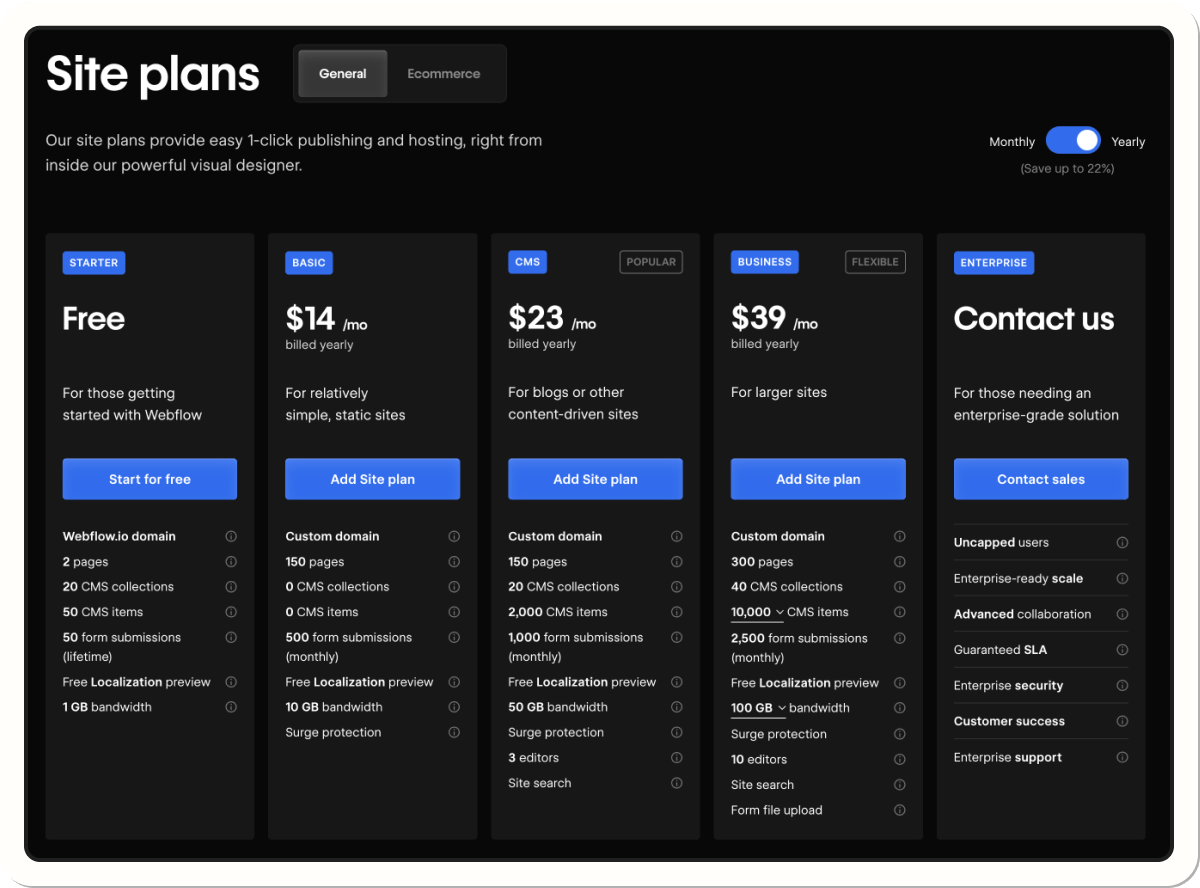
Wix, on the other hand, offers more affordable pricing options, with plans starting at around €5 per month for basic sites, and e-commerce plans around €20 per month. That makes Wix especially appealing for users looking for strong value without advanced technical customization.
In short, Webflow is a fit for users ready to invest for full control over their site, while Wix is ideal for those looking for a budget-friendly, fast-to-launch solution.
Webflow vs Wix: which offers better customer support?
Webflow and Wix both offer support services to help users, but their approaches differ.
Webflow offers support primarily in English, with detailed documentation and tutorials through Webflow University. Users can also ask questions in the community forum, where experts and other members share their knowledge. For specific issues, Webflow offers a support portal that lets you contact the support team directly.
Wix, meanwhile, has a comprehensive Help Center in French, offering articles, tutorials, and videos to guide users. For more complex questions, Wix offers customer support with French phone callback options, available Sunday through Friday, from 7 a.m. to 10 p.m. UTC.
In short, Webflow is mainly aimed at an English-speaking audience with a strong online community, while Wix offers more localized, accessible support in French, including phone support to meet the specific needs of French-speaking users.
Use cases: should I use Wix or Webflow if I’m a freelancer?
If you’re a freelancer, Wix may feel simpler at first thanks to its quick templates. But Webflow gives you much more design freedom, which is ideal for building a unique, differentiated portfolio. You can also optimize your site for SEO, attract clients through Google, and showcase your expertise with a site that stands out.
Use cases: should I use Wix or Webflow if I’m a startup?
For a startup, flexibility and scalability matter. Wix can work for a fast MVP, but Webflow is better suited to long-term growth: CMS integration, SEO, customization, and evolution without a full redesign. The result: your site grows with your business, without technical constraints.
Use cases: should I use Wix or Webflow if I’m a SaaS company?
A SaaS business needs to convince fast and convert efficiently. With Webflow, you can build custom landing pages optimized for SEO and acquisition. The CMS lets you power your blog, resource hub, and user support content. Wix, being more limited, can hold back the scalability and premium feel a high-growth SaaS needs.
Good to know
Heading
Lorem ipsum dolor sit amet, consectetur adipiscing elit. Suspendisse varius enim in eros elementum tristique. Duis cursus, mi quis viverra ornare, eros dolor interdum nulla, ut commodo diam libero vitae erat. Aenean faucibus nibh et justo cursus id rutrum lorem imperdiet. Nunc ut sem vitae risus tristique posuere.

.avif)








Lorem ipsum
Lorem ipsum dolor sit amet, consectetur adipiscing elit, sed do eiusmod tempor incididunt ut labore et dolore magna aliqua. Ut enim ad minim veniam, quis nostrud exercitation ullamco laboris nisi ut aliquip ex ea commodo consequat. Duis aute irure dolor in reprehenderit in voluptate velit esse cillum dolore eu fugiat nulla pariatur.



.webp)