Projects
 Our Offers
 Dedicated team
 Blog
 Academy
 About Us
Comparisons7 min read
Webflow vs Webstudio: the 2026 comparison
Webflow and Webstudio deliver on the same promise: building professional websites visually, without sacrificing code quality.
In 2026, the choice between these two tools mostly comes down to ecosystem maturity (Webflow) vs developer-oriented flexibility (Webstudio).
This guide breaks down the differences, shared strengths, use cases, and practical criteria to help you choose one or the other.
Goal: help you make a quick decision based on your profile, budget, and projects.
Webflow vs Webstudio: what are the differences?
Positioning and product philosophy
Webflow is now a very mature solution, widely adopted by designers, marketing teams, and specialized agencies, especially within a specialized Webflow agency that can fully leverage its ecosystem and performance. Webstudio is younger and targets teams that produce clean code, with a philosophy closer to developer workflows (Git, export, fine front-end control).
| Criteria | Webflow 2026 | Webstudio 2026 |
|---|---|---|
| Product maturity | Very mature, broad ecosystem | Young, still evolving fast |
| Main target audience | Designers, agencies, marketers | Technical designers, front-end developers |
| Product priority | Visual experience + CMS + managed hosting | Clean, exportable code, integration with an existing stack |
| No-code level | Very complete, very little code needed | More “low-code” / “dev-friendly” |
| Strategy | Closed all-in-one platform | Open tool, closer to Git / dev workflows |
- Webflow prioritizes an integrated experience (designer + CMS + hosting).
- Webstudio prioritizes technical freedom (export, integration with the rest of your stack).
This difference in positioning often raises the question of whether Webflow is still pure no-code or whether it’s moving closer to low-code, a topic we cover in our analysis of Webflow no-code or low-code.
Design interface and no-code experience
Both offer an advanced visual interface, but with a different approach to complexity.
Major interface differences
- Webflow
- Rich but dense interface, close to a design tool + CSS inspector.
- Very visual “box model” convention, well suited to designers.
- Lots of panels, options, and contextual menus → powerful but intimidating at first.
- Interface inspired by front-end IDEs and the DOM.
- Logic closer to native HTML/CSS, with less of a “layer on top.”
- Targets people who are comfortable with code structure, even if they don’t write everything by hand.
| Aspect | Webflow | Webstudio |
|---|---|---|
| Learning curve | More gradual, lots of visual resources | More technical, closer to code logic |
| CSS control | Very granular, via panels | Very granular, often more explicit at the property level |
| Learning for a complete beginner | More accessible over time, but a shock at first | Can feel more “dev” from the start |
Technical architecture, hosting, and code export
This is one of the biggest points of divergence.
- Webflow
- Managed hosting (high-performance global CDN).
- Static code export possible (HTML/CSS/JS), but without CMS or e-commerce.
- Closed architecture: no full self-hosting with Webflow CMS.
- Focuses on exportable, controllable code.
- Built for integration with environments like GitHub + deployment on external platforms.
- Managed hosting available, but the key promise is hosting freedom.
Webflow relies on fully managed Webflow hosting, powered by a high-performance CDN, which greatly simplifies launch and maintenance for non-technical teams.
Architecture / export comparison
| Criteria | Webflow | Webstudio |
|---|---|---|
| Native hosting | Yes, required for CMS/e-commerce | Yes (depending on plan), but more optional |
| Code export | Static, without CMS or e-commerce | Production-oriented export (full front end), focus on clean code |
| Self-hosting | Partial (static sites) | Designed to be complete (depending on the chosen stack) |
| CI/CD integration | Indirect (via export) | More natural (Git, dev workflows) |
CMS, advanced logic, and content management
Webflow is years ahead on native CMS. Webstudio is catching up or relies more on integrations / external solutions.
- Webflow CMS
- Collections, custom fields, relationships.
- Editor for clients, roles, scheduled publishing (on advanced plans).
- Volume limits (number of collections, items).
- Features still less extensive than Webflow.
- Often paired with external headless CMSs (Sanity, Contentful, etc.).
- More modular, but less plug and play for non-technical users.
| Aspect | Webflow CMS | Webstudio CMS / integrations |
|---|---|---|
| Integrated native CMS | Yes, mature | Yes, but younger, or via external headless CMS |
| Relationships / references | Yes (multi-references, dynamic links) | Possible, often via external CMS |
| Client interface | Very polished | Varies depending on the chosen solution |
| Technical complexity | Low to medium | Medium to high (depending on integration) |
Learning curve and target user profile
The two tools overlap, but the “ideal user” isn’t exactly the same.
Best-fit profiles
- Webflow
- Web designers who want to build sites without a developer.
- No-code agencies, creative studios.
- Marketers with time to learn.
- Designers with real HTML/CSS/JS knowledge.
- Front-end developers who want to save time on UI.
- Product / tech teams integrating the front end into their Git pipeline.
Summary by profile
| Profile | Webflow | Webstudio |
|---|---|---|
| Complete beginner | Possible, but needs support | Harder |
| Designer without code | Very suitable | Suitable if they want to improve their front-end logic |
| Designer + front-end basics | Excellent fit | Excellent fit, even more so if they work closely with devs |
| Front-end developer | Interesting for mockups + fast deliverables | Very interesting, Git integration + code control |
Webflow vs Webstudio: what do they have in common?
Summary table of shared points
| Feature / Concept | Webflow | Webstudio | Main nuance |
|---|---|---|---|
| Visual page building | Yes | Yes | Different UI approach |
| Responsive design (breakpoints) | Yes | Yes | Fine control in both cases |
| Reusable styles / classes | Yes | Yes | Similar CSS logic |
| Animations / interactions | Yes, very advanced | Yes, improving fast | Webflow is more mature |
| Built-in forms | Yes | Yes | Webstudio more often depends on integrations |
| Dynamic content management | Yes (CMS) | Yes (CMS / headless) | Webflow is more plug and play |
| Third-party integrations (scripts, embeds) | Yes | Yes | Great freedom in both |
| Collaboration / project sharing | Yes | Yes | Different levels of granularity |
Visual construction of responsive websites
Both use a block-based visual builder, with multi-breakpoint management.
- Drag & drop, DOM hierarchy, CSS classes.
- Control over margins, grids, flexbox, etc.
- Responsive preview by breakpoint (mobile, tablet, desktop…).
CMS management and dynamic collections
- Webflow: highly integrated native CMS → ideal for blogs, editorial sites, portfolios.
- Webstudio: native CMS + the ability to connect other CMSs (headless).
Concrete common points
- Item collections (articles, projects, products…).
- Dynamic pages based on a template.
- Filters, sorting, pagination.
Animations, interactions, and micro-transitions
Both let you create advanced interactions without writing JS.
Animation capabilities comparison
| Interaction type | Webflow | Webstudio |
|---|---|---|
| Scroll-based animations | Yes, very advanced | Yes (features improving) |
| Hover, click, focus | Yes | Yes |
| Complex page animations | Yes (timelines, multi-step) | More limited, but sufficient |
| Custom JS integration | Yes (embeds, custom code) | Yes (ideal for devs) |
Forms, on-page SEO, and technical performance
- Native forms in both, connectable to third-party tools (Zapier, Make, CRMs…).
- Management of title tags, meta descriptions, alt tags, ARIA attributes, etc.
- Performance: generated code is generally lightweight, especially when best practices are applied. Webstudio puts particular emphasis on code quality.
Collaboration, teamwork, and publishing workflows
- Webflow: agency-oriented collaborative work (content editor, designer, client).
- Webstudio: collaborative work closer to dev workflows (Git, branches, code reviews).
Key similarities
- Ability to duplicate projects / pages.
- Draft / production environment management.
- Partial or full site publishing.
We’ve written and published many CMS comparisons, and you can find them here:
Webflow vs Webstudio: which tool for which type of project?
Project type decision table
| Project type | Webflow: suitable? | Webstudio: suitable? |
|---|---|---|
| Marketing landing page | Excellent | Excellent |
| SMB / startup showcase website | Excellent | Good, especially if the team is technical |
| Blog / editorial site with medium volume | Very good | Good, via a more technical CMS |
| Large media site / very high-volume site | Possible, but CMS limits to watch | Often better with headless CMS + Webstudio |
| Standard e-commerce | Good, native Webflow e-commerce | Handled through third-party integrations |
| Light web app / portal | Limited without a lot of custom code | More flexible on the front end + integrations |
| Projects for agencies / freelancers | De facto standard in no-code | Differentiating for a “dev-friendly” offer |
| Enterprise projects / existing stack | Very good if you accept the closed ecosystem | Interesting for integration into a custom stack |
Contrary to popular belief, more and more large companies are adopting Webflow for their marketing sites, as our analysis on why large companies use Webflow shows.
Marketing landing pages and showcase websites
- Webflow
- Many templates, advanced animations.
- Very fast launch with integrated hosting.
- Excellent control over generated code → performance.
- Ideal if you want to integrate into a monorepo or CI pipeline.
In short: for a simple landing page, Webflow is faster for a pure designer to get up and running; Webstudio is very attractive for a product / dev team.
Blogs, editorial sites, and high-volume content
- Webflow is very good up to a certain threshold (collection, item, and API limits).
- Beyond that (large media, very advanced SEO), many stacks opt for a headless CMS + custom front end → a natural fit for Webstudio.
For standard editorial projects, building a blog on Webflow remains a very effective solution thanks to its native CMS, as long as you stay within reasonable volumes.
E-commerce and conversion funnels
- Webflow e-commerce
- Integrated e-commerce module (products, cart, checkout).
- Functional limits compared with Shopify, but enough for many simple catalogs.
The Webflow e-commerce module is a perfect fit for simple to mid-sized stores, with strong branding needs and an autonomous marketing team.
- Webstudio
- No native e-commerce module this complete yet.
- It relies on integrations: Snipcart, Lemon Squeezy, Stripe Checkout, etc.
Typical recommendation
- Simple store, strong branding, autonomous marketing team → Webflow.
- E-commerce already connected to a custom / headless stack → Webstudio for the front end.
Projects for agencies, freelancers, and studios
- No-code agencies / web design
- Webflow remains the benchmark: market demand, easy hiring around this tech.
- Webstudio makes more sense for building front ends integrated into an existing tech stack, with designer/dev collaboration.
Advanced use cases: light web apps, portals, SaaS marketing
For these cases, the “separate front end + backend” logic is key:
- Webflow
- Possible, but you quickly move beyond “simple no-code” and pile up custom code and integrations.
- More natural: well-structured front end + API calls + external backend logic.
Webflow vs Webstudio: ease of use, learning, and documentation
User interface, usability, and workflow logic
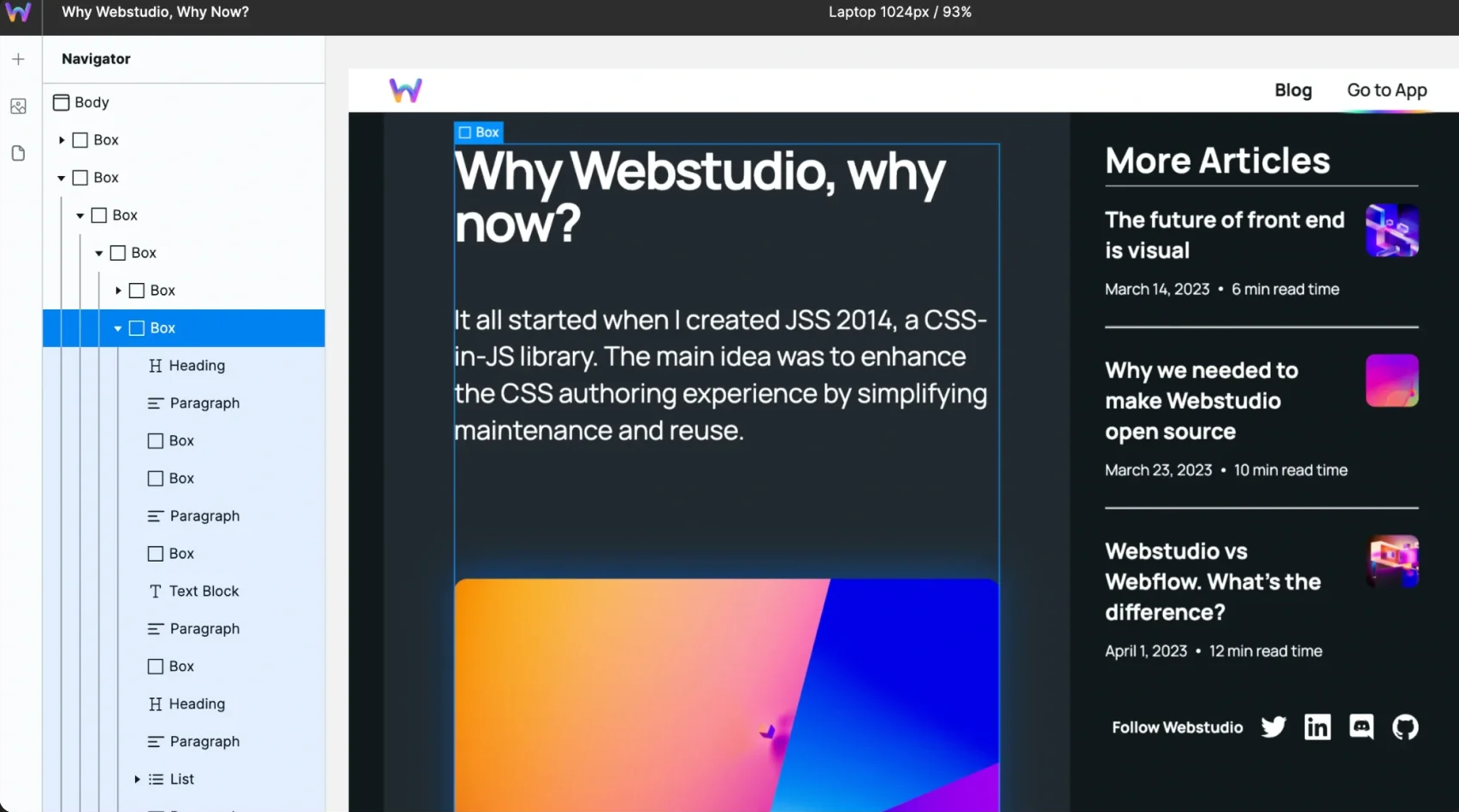
- Webflow: very polished usability, but a lot to get used to.
- Webstudio: rougher, but very clear logic for a dev profile.
Perceived strengths / weaknesses
| Tool | UX strengths | UX weaknesses |
|---|---|---|
| Webflow | Polished, consistent interface, well documented | Dense options, risk of cognitive overload |
| Webstudio | Close to the HTML/CSS mental model, very readable | Less polished, may intimidate non-technical users |
Tutorials, official documentation, and guides
- Webflow
- Webflow University: global benchmark (videos, courses, docs).
- Community tutorials, YouTube channels, blogs, paid training.
- Official documentation growing.
- Fewer third-party resources for now → more technical autonomy required.
Communities, external resources, and training
- Webflow: huge community (Slack, Discord, forums, events, Webflow Conf).
- Webstudio: smaller but engaged community, lots of technical discussions (GitHub issues, Discord, Reddit).
Availability of resources
- Templates, clonables, ready-to-use UI components:
- Abundant for Webflow.
- Growing fast but more limited for Webstudio.
Average time to become operational on each tool
Estimate to become “autonomous on a first simple professional site,” starting from scratch and spending a minimum amount of time each week:
| Profile | Webflow (approx.) | Webstudio (approx.) |
|---|---|---|
| Complete beginner | 1–3 months | 2–4 months (more technical) |
| Designer + front-end basics | 2–4 weeks | 3–6 weeks |
| Front-end developer | 1–2 weeks | 1–2 weeks |
Webflow vs Webstudio: no-code features, CMS, and advanced logic
Page structures, global styles, and design system
- Both allow:
- Global styles (typography, colors, spacing).
- Reusable components.
- Setting up a design system.
Main difference: Webstudio often exposes the front end as structured code closer to a dev project, while Webflow feels like a no-code project built for designers.
CMS: collections, relationships, dynamic content
Webflow CMS
- Collections with custom fields.
- Simple / multiple relationships.
- Limits to watch (number of fields, items, etc.).
Webstudio + CMS
- Less turnkey CMS.
- Ideal if you know how to configure a headless CMS and use it via API.
Conditions, filters, conditional logic, and personalization
- Webflow: conditional display logic (show/hide an element based on a condition).
- Webstudio: same logic, plus easier custom code handling (JS, API) for complex cases.
Examples of use cases covered in both tools
- Show a block if a CMS field is filled in.
- List filters (categories, tags).
- Custom messages based on a form’s state.
Multilingual management and localized content
- Webflow: multilingual support possible via:
- Native features (localization) on certain plans.
- Or third-party integrations (Weglot, Localize, etc.).
Webflow now offers a native feature dedicated to multilingual management, covered in our guide to Webflow Localization, especially well suited to international marketing sites.
Practical decision
- Simple multilingual project, non-technical team → Webflow is simpler.
- Complex multilingual project, headless stack → Webstudio is more flexible.
Depending on the complexity of the project, it’s entirely possible to build multilingual websites with Webflow, either through native features or with more advanced third-party tools.
Webflow vs Webstudio: performance, SEO, and accessibility
Loading speed, Core Web Vitals, and front-end optimization
Both can produce very fast sites if configured well.
- Webflow:
- Automatic image optimization, basic minification.
- Generally performant loading by default.
- Highlights clean, fine-grained code structure.
- Excellent foundation for advanced optimizations (front-end dev).
Beyond the tool itself, SEO performance depends mostly on content structure, technical optimizations, and editorial strategy, elements usually handled by a Webflow SEO agency used to no-code and Core Web Vitals challenges.
Built-in SEO tools (tags, sitemaps, redirects)
Webflow
- Meta tags, Open Graph, canonicals.
- Automatic sitemap.
- 301 redirect management in the interface.
- Control over slugs, breadcrumbs, etc.
Webstudio (2026)
- Tag management and on-page SEO.
- Redirects and sitemaps possible, sometimes more technical (depending on hosting).
- Great playground for advanced SEO via a custom stack.
Accessibility: best practices and each tool’s limits
- Both tools allow:
- Adding alt tags, ARIA attributes, roles.
- Structuring the DOM (Hx headings, lists, etc.).